老师,现在的这个版本event是旧的,请问可以用什么代替event
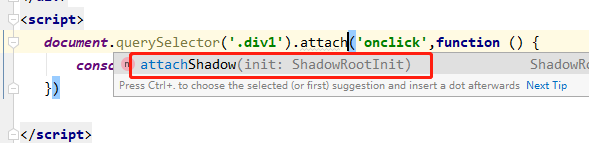
老师,我这里没有attachEvent,请问这是怎么回事,
直接写上去运行拨错的。
<!DOCTYPE html>
<html lang="en">
<head>
    <meta charset="UTF-8">
    <meta http-equiv="X-UA-Compatible" content="IE=edge">
    <meta name="viewport" content="width=device-width, initial-scale=1.0">
    <title>22</title>
    <style>
        .div1{
            width: 400px;
            height: 400px;
            background-color: orange;
            position: relative;
        }
        .div2{
            width: 100px;
            height: 100px;
            /* padding: 150px; */
            position: absolute;
            left:150px;
            top: 150px;
            background-color: orangered;
        }
    </style>
</head>
<body>
    <div class="div1">
        <div class="div2"></div>
    </div>

    <script>
        var div1=document.querySelector('.div1');
        var div2=document.querySelector('.div2');
function test1(){
    console.log('div1事件发生在'+event.currentTarget.className);
    console.log('div1事件触发者'+event.target.className);
}
function test2(){
    console.log('div2事件发生在'+event.currentTarget.className);
    console.log('div2事件触发者'+event.target.className);
}
div1.addEventListener('click',test1,true);
div2.addEventListener('click',test2,true)

    </script>
</body>
</html>
老师为什么不能改成捕获传递 我点击大的div1,test2()方法第一次就可被调用 再刷新后点击反应了?
<!DOCTYPE html>
<html lang="en">
<head>
    <meta charset="UTF-8">
    <meta http-equiv="X-UA-Compatible" content="IE=edge">
    <meta name="viewport" content="width=device-width, initial-scale=1.0">
    <title>Document</title>
    <style>
        body{
            height: 2000px;
       background: linear-gradient('skyblue','pink');

        }
    </style>
</head>
<body>
    <span>密码:</span><input type="password"><span class="passwordSpan"></span>

    <script>
        var password=document.querySelector('input');
        var passwordSpan=document.querySelector('.passwordSpan');
        var flag=false;

        // document.body.onkeydown=function(){
        //     if(event.keyCode==20){
        //         flag=!flag;
        //     }
        //     if(flag){
        //         passwordSpan.innerHTML='现在是大写';

        //     }else{
        //      passwordSpan.innerHTML='现在是小写'
        //     }
        // }
        // document.body.onkeydown=function(){
        //     if(event.keyCode==40){
        //         window.onscroll=function(){
        //              var top=document.body.scrollTop||document.documentElement.scrollTop;

        //         top=top-500;
        //         document.body.scrollTop=top;
        //         document.documentElement.scrollTop
        //         console.log(document.body.scrollTop||document.documentElement.scrollTop);
        //         }

        //     }
        //     if(event.keyCode==38){
        //         window.onscroll=function(){
        //              var top=document.body.scrollTop||document.documentElement.scrollTop;
        //         top=top+500;
        //         document.body.scrollTop=top;
        //         document.documentElement.scrollTop;
        //         console.log(document.body.scrollTop||document.documentElement.scrollTop);
        //         }

        //         }
        //     }
      window.onscroll=function(){
        console.log("top"+document.documentElement.scrollTop||document.body.scrollTop);
      }

        window.onkeydown=function(){
            console.log(event.keyCode);
            if(event.keyCode==65){
                var top=document.documentElement.scrollTop||document.body.scrollTop;
                top-=100;
                document.documentElement.scrollTop=top;

                document.body.scrollTop=top;

            }
            if(event.keyCode==68){
                var top=document.documentElement.scrollTop||document.body.scrollTop;
                top+=100;
                document.documentElement.scrollTop=top;

                document.body.scrollTop=top;

            }
        }
    </script>
</body>
</html>
老师 系统自带箭头滚动功能怎么搞 我设置了上箭头向上滚动200 还是2 来滚动
<!DOCTYPE html>
<html>
<head>
    <meta charset="UTF-8">
    <meta http-equiv="X-UA-Compatible" content="IE=edge">
    <meta name="viewport" content="width=device-width, initial-scale=1.0">
    <title>Document</title>
    <style>
     .boderRed{
         border: 2px solid red;
     }
     .boderGreen{
         border: 2px solid green;
     }
     .colorRed{
         color: red;
     }
     .colorGreen{
         color: green;
     }
    </style>
</head>
<body>
    <form action="" method="post">
      <span class="">用户:</span>
      <input type="text">
      <span></span>
    <button>提交</button>
    </form>
    <script>
var input=document.querySelector('.username');
var span=document.querySelector('.usernameSpan');
var btn=document.querySelector('button');
//自动获取焦点
input.focus();
input.onblur=function(){
    if(input.value.length==11){
    this.className='boderGreen';
    span.className='colorGreen';
    span.innerHTML='正确';
    }else{
        this.className='boderRed';
    span.className='colorRedn';
    span.innerHTML='错误';

    }
}
btn.onclick=function(){
   input.focus();
   input.blur();
   input.focus();

}
    </script>
</body>
</html>
老师为啥错误的时候 不会再获取焦点了?
<!DOCTYPE html>
<html lang="en">
<head>
    <meta charset="UTF-8">
    <meta http-equiv="X-UA-Compatible" content="IE=edge">
    <meta name="viewport" content="width=device-width, initial-scale=1.0">
    <title>Document</title>
    <style>
           .div1{
            background-color: blue;
            width: 500px;
            height: 500px;
        }
        .div2{
            background-color:pink;
            width: 200px;
            height: 200px;
            margin: 150px;
        }
    </style>
</head>
<body>
    <div class="div1">
        div1
        <div class="div2">div2</div>
    </div>
    <!-- 鼠标事件
    1.单击:click
    2.双击:dblclick
    3.鼠标按时:mousedown
    4.鼠标抬起:mouseup
    5.鼠标移动时:mousemove

    6鼠标移入时候/移出事:(不冒泡) mouseenter/mouseleave
     7鼠标移入时候/移出事:(不冒泡) mouseover/mouseout

    -->
    <script>
    var div1=document.getElementsByClassName('div1');
    var div2=document.getElementsByClassName('div2');
    function test1() {
        console.log('这是div1');

    }
    function test2() {
        console.log('这是div2');

    }
    var EVe={
       AA: function(ele,event,fun,bool){
         if(ele.addEventListener){
           ele.addEventListener(event,fun,bool)
         }else{
                ele.attaEvent('on'+event,fun,bool)
         }
       }
    }
      EVe.AA(div1,'click',test1,false)
    </script>
</body>
</html>
啥问题
<!DOCTYPE html>
<html lang="en">
<head>
    <meta charset="UTF-8">
    <meta http-equiv="X-UA-Compatible" content="IE=edge">
    <meta name="viewport" content="width=device-width, initial-scale=1.0">
    <title>Document</title>
    <style>
          .div1{
            background-color: blue;
            width: 500px;
            height: 500px;
        }
        .div2{
            background-color:pink;
            width: 200px;
            height: 200px;
            margin: 150px;
        }
    </style>
</head>
<body>
    <div class="div1">这是div1
        <div class="div2">这是div2</div>
    </div>
    <button class="btn">删除</button>
    <script>
        var div1=document.querySelector('.div1');
        var div2=document.querySelector('.div2');
        var btn=document.querySelector('.btn');
        function fun1(){
            console.log('这是div1');
        }
        function fun3(){
            console.log('这是div1第二次');
        }
        function fun2(){
            console.log('这是div2');
        }
        div1.attachEvent('click',fun1);
        div2.attachEvent('click',fun2);
        div1.attachEvent('click',fun3);
    </script>
</body>
</html>
老师,他说不支持这个方法
<!DOCTYPE html>
<html lang="en">
<head>
    <meta charset="UTF-8">
    <title>随机生成一个4到6位的字符串</title>

</head>
<body>
<script>
   //获取随机整数函数,就是下面的索引和4-6位字符串长度的产生
   function getRandomNum(min,max){
       return Math.floor(Math.random()*(max-min)+min);
   }
   //获取字符串函数
    function getRandomStr(length){
            //定义字符串
            var characterDic = "ABCDEFGHIJKLMNOPQRSTUVWXYZabcdefghijklmnopqrstuvwxyz1234567890";
            var finalAtr='';
            for (var i=0;i<length;i++){
                //获取随机索引
                var index = getRandomNum(0,64);
                //获取到随机字符
                var tempStr = characterDic[index];
                finalAtr += tempStr;//字符串联起来
            }
            return finalAtr;
    }
    var num = getRandomNum(4,7);//4-6位字符串
    var str = getRandomStr(num);
    console.log(str);


</script>
</body>
</html>

问题:
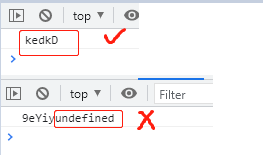
    4-6位字符串的效果有,但是也会出现4-6位字符串
+undefined的效果,不知道这是怎么回事,请老师指点迷津,谢谢!
<!DOCTYPE html>
<html lang="en">
<head>
    <meta charset="UTF-8">
    <meta http-equiv="X-UA-Compatible" content="IE=edge">
    <meta name="viewport" content="width=device-width, initial-scale=1.0">
    <title>Document</title>
</head>
<body>
<div class="div1">
    <div class="div2">
        这是div2
    </div>
    <div class="div3">这是div3</div>
    <button class="add">增加</button>
    <button class="remove">删除</button>
</div>
    <script>

     var addbut=document.querySelector('.add');
     var div1=document.querySelector('.div1');
     var div2=document.querySelector('.div2');
     var div3=document.querySelector('.div3');
     var divs=document.querySelectorAll('div')
  var  rebut=document.querySelector('.remove');

  addbut.onclick=function(){//新增一个class为newDiv的div
      var div=document.createElement('div');
      var div_class=document.createAttribute('class');
      div.setAttributeNode(div_class);
      div_class.value='newDiv';
      div.innerHTML='div';
      div1.insertBefore(div,div3);
      console.log(div1.childNodes);
  }

  rebut.onclick=function(){//删除最后一个class为newdiv 的div
    var divs=document.querySelectorAll('newDiv');
 div1.removeChild(divs[divs.length-1])


  }


    </script>
</body>
</html>
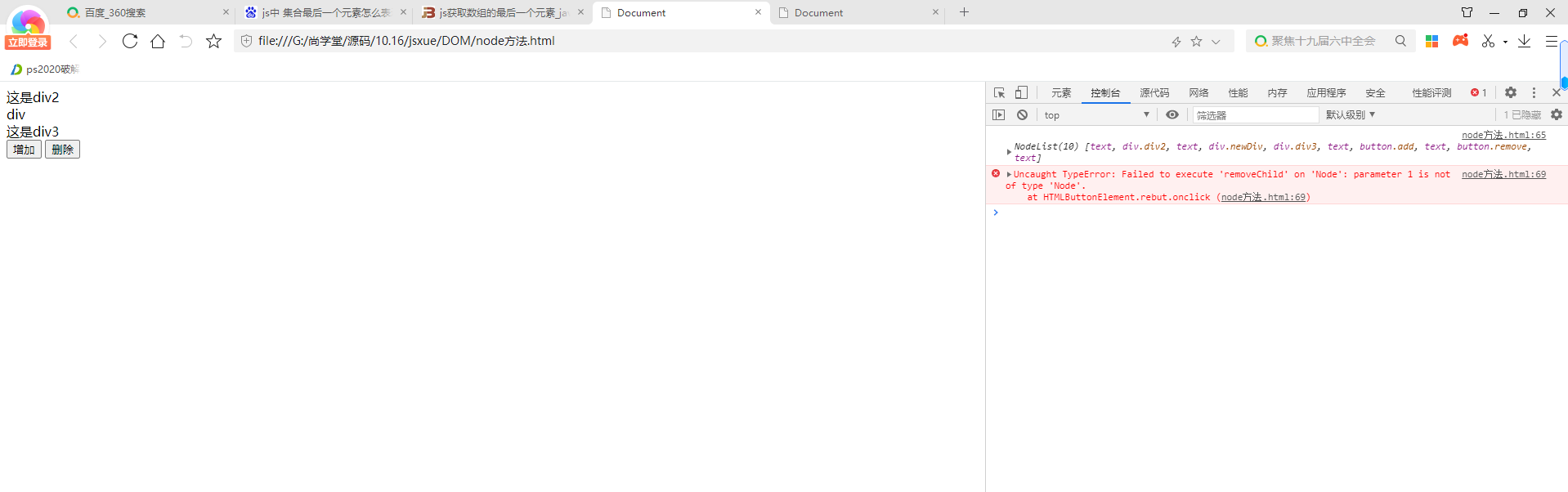
老师我想点击删除按钮的时候 删除最后一个新增的div 怎么报错删除的不是节点
<!DOCTYPE html>
<html lang="en">
<head>
    <meta charset="UTF-8">
    <meta http-equiv="X-UA-Compatible" content="IE=edge">
    <meta name="viewport" content="width=device-width, initial-scale=1.0">
    <title>键盘事件案例</title>
</head>
<body>
    <p>
        <span>密码:</span>
        <input type="password">
        <span class="showSpan">大写锁定已关闭</span>
    </p>
    <script>
        var input = document.querySelector('input');
        var showSpan = document.querySeletor('.showSpan');
        var flag=false;//表当前是关闭状态
        input.onkeydown = function(){
            if(event.keyCode==20){
                if(flag=false){
                    flag=true;//改变flag的状态,保证与capslock状态一致
                    showSpan.innerHTML = '大写锁定已打开';
                }else{
                    flag=false;
                    showSpan.innerHTML = '大写锁定已关闭';
                }
            }
        }
    </script>
</body>
</html>
老师 不论点击Capslock键几次 input框后面span内容一直都是大写锁定已关闭 不会切换为大写锁定已打开
<!DOCTYPE html>
<html lang="en">
<head>
    <meta charset="UTF-8">
    <title></title>
</head>
<body>
<script>
    //函数当做函数的返回值
    function info(){
        console.log("我是谁"+"会唱歌");
        function caiyi() {
            console.log('表演才艺')
        }
        return caiyi;
    }
   info();//打印的是  我是谁会唱歌

   console.log(info());//打印的是 我是谁会唱歌+函数caiyi();

   var result=info();
   result();//打印的是 我是谁会唱歌+表演才艺
</script>
</body>
</html>
有两个无问题请老师帮忙解答一下 谢谢
问题1:
 info();和console.log(info());这两个打印出来的效果为什么不一样。

 问题2:
   return caiyi;返回的是什么,函数caiyia();还是函数里面的内容。
<!DOCTYPE html>
<html lang="en">
<head>
    <meta charset="UTF-8">
    <meta http-equiv="X-UA-Compatible" content="IE=edge">
    <meta name="viewport" content="width=device-width, initial-scale=1.0">
    <title>Document</title>
</head>
<body>
<div class="div1">
    <div class="div2">
        这是div2
    </div>
    <button>点我</button>
</div>
    <script>
        /*node方法
        1.appendChild()
        node1.appendChild(node2)  将节点2插入在node1最后面
        注意 js创建的节点对象之间没有文本对象
        2、hasChildNodes()  此方法返回一个布尔值  是否有子节点
        3、cloneNode(布尔值) 克隆节点,布尔值如果true 则克隆子节点 如果为flase 则不克隆子节点
          克隆节点不会克隆原节点的事件 但是会复制属性和内容

        */
     var div1=document.querySelector('.div1');
     var div3=document.createElement('div');
     var div4=document.createElement('div');
     var but=document.querySelector('button');
     div3.innerHTML='lalal';
     div1.appendChild(div3);
     div1.appendChild(div4)
     console.log(div1.childNodes);
     var num=1;
     var str='这是第'+num+'克隆';
     but.onclick=function(){
        var clonebut=but.cloneNode(true);
       clonebut.innerHTML=str;
         div1.appendChild(clonebut);
      num+=1;
         console.log(num);
     }

    </script>
</body>
</html>
老师 这个事件里面的num累加怎恶保存到全局变量num
<!DOCTYPE html>
<html lang="en">
<head>
    <meta charset="UTF-8">
    <title>Title</title>
</head>
<body>
<script>
    var obj={};
    obj['name']='zhangsan';
    obj['method']=function eat(){
        console.log("饿了么");
        return;
    };
    //调用方法
         obj.method();
         console.log(obj);

</script>
</body>
</html>
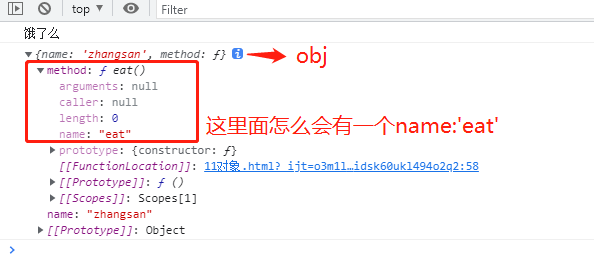
老师 打印出来的结果不理解,如图,请帮忙解释一下,谢谢
<!DOCTYPE html>
<html lang="en">

<head>
    <meta charset="UTF-8">
    <meta http-equiv="X-UA-Compatible" content="IE=edge">
    <meta name="viewport" content="width=device-width, initial-scale=1.0">
    <title>Document</title>

</head>

<body>

    <script>
        var arr = ['首页', '军事', '论坛', '视频'];
        //创建、设置ul元素
        var u = document.createElement('ul');
        var u_css = document.createAttribute('style');
        u_css.value = 'list-style:none;margin:0;padding:0';
        u.setAttributeNode(u_css)
        //创建li a元素 并设置元素
        for (var i = 0; i <= arr.length - 1; i++) {
            var li = document.createElement('li');
            var li_css = document.createAttribute('style');
            li_css.value = 'display:inine-block;widht:100px;height:30px;line-height=30px;background=skyblue;aligin=center';
            li.setAttributeNode(li_css);
            var a = document.createElement('a');
            var a_css = document.createAttribute('style');
            a_css.value = 'text-decoration: none;';
            a.innerHTML = arr[i];
            a.setAttributeNode(a_css);

            console.log(a.innerHTML);

            li.appendChild(a);
            u.appendChild(li);

        }
        document.body.appendChild(u);
    </script>
</body>

</html>
老师为啥我 li的css出不来
18分46秒的时候这里卡了一下 对于中括号和点运算符在这个for in当中的区别没说明白 想问下老师 为什么要用中括号
非常抱歉给您带来不好的体验!为了更深入的了解您的学习情况以及遇到的问题,您可以直接拨打投诉热线:
我们将在第一时间处理好您的问题!
关于
课程分类
百战未来微信公众号
百战未来微信小程序
©2014-2026百战汇智(北京)科技有限公司 All Rights Reserved 北京亦庄经济开发区科创十四街 赛蒂国际工业园网站维护:百战汇智(北京)科技有限公司 京公网安备 11011402011233号 京ICP备18060230号-3 营业执照 经营许可证:京B2-20212637








 京公网安备 11011402011233号