<!DOCTYPE html>
<html lang="en">
<head>
    <meta charset="UTF-8">
    <title>window.name属性</title>
</head>
<body>
<button>跨域传输</button>
<script>
/*    var name = 123;
    console.log(name);
    console.log(typeof name);   //string
    var age = 123;
    console.log(age);
    console.log(typeof age);   //number*/

    //在106page中有定义的var num,想在本页面打印num值
    //如果想要获取一个页面内的信息,那么必须先加载
    var but = document.querySelector('button');
    but.onclick = function () {
        var iframe = document.createElement('iframe');   //创建内联框架(页面中嵌套另个页面)
        iframe.src = 'page.html';    //加载保存了信息的页面(另个页面page.html)
        iframe.style.display = 'none';
        document.body.appendChild(iframe);
        //当iframe加载完毕,意味着window.name的内容已经被赋予完毕
        //page.html中的内容window.name = 'var num = 10;';
        iframe.onload = function (eve) {
            var iframeWindowName = eve.target.contentWindow.name;
            console.log(iframeWindowName);  //打印字符串 var num = 10;
            //将字符串解析为代码
            eval(iframeWindowName);
            console.log(num);    //字符串中的内容 10
        }
    }
</script>
</body>
</html>
其中调用的页面page的代码
<!DOCTYPE html>
<html lang="en">
<head>
    <meta charset="UTF-8">
    <title>page</title>
</head>
<body>
<script>
    window.name = 'var num = 10;';
</script>
</body>
</html>
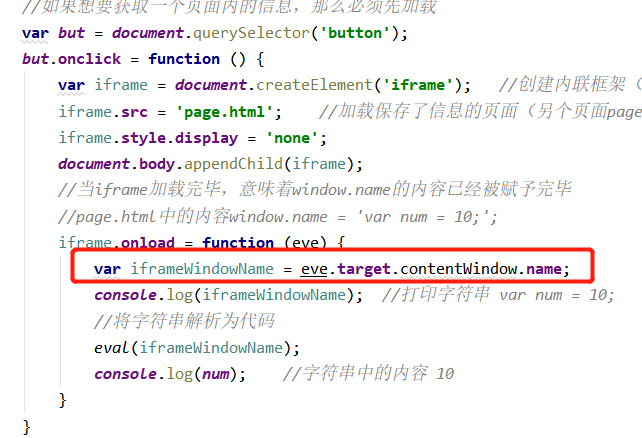
想问下代码中圈红的内容,是获取的调用页面中整个的内容吗?调用页面中填加script的内容,也可以一起调用吗?还是只调用的body中的内容或者哪个部分的?
<!DOCTYPE html>
<html lang="en">

<head>
    <meta charset="UTF-8">
    <meta name="viewport" content="width=device-width, initial-scale=1.0">
    <title>Document</title>
</head>
<style>
    div {
        width: 30px;
        height: 30px;
        background-color: pink;
        position: absolute;
        line-height: 15px;
        text-align: center;
    }
</style>

<body>
    <input type="range" min="0" max="100" value="50">
    <div id="box"></div>

    <script>

        var input = document.querySelector("input")
        var div = document.getElementById('box');
        var flag = false;
        input.onmousedown = function () {
            console.log("(x,y):(" + event.clientX + "," + event.clientY + ")");
        }

    </script>
</body>

</html>
老师,我是什么步骤错了,鼠标事件一直没效果,是没获取到input吗
<script>
    function info() {
        console.log('我是XXX');
        console.log('我很会唱歌吖');
        function caiyi() {
            console.log('我可以开始表演才艺');
        }
        return caiyi;
    }
    var result = info();
    result();

</script>
老师您好,我还是不太能理解
1、在把函数当做返回值的时候才能用到return吗?
2、info();和给他赋值为result有什么区别,为什么赋值后就可以接收到caiyi()?不太能理解原理
老师好,本章的课后练习“4.编写一个button。要求鼠标点击一次能够让页面中的某个div向右移动50像素。
”,我写完代码后发现按第一次按钮后,偏移了50px,后面继续按就不发生偏移,请教老师代码应如何修改和正确的方向。
代码如下:
<!DOCTYPE html>
<html lang="en">
<head>
    <meta charset="UTF-8">
    <title>编写一个div,要求鼠标按下不抬起时。每隔1s输出一句hello world;</title>
    <style>
        .div1{
            width:700px;
            height:500px;
            background-color: lightgray;
            border:1px solid black;
            position:absolute;
        }
        .button{
            position: absolute;
            top:600px;
        }
    </style>
</head>
<body>
<div class="div1"></div>
<button class="button" type="button" >点我左移</button>
<script>
    var div1=document.querySelector('.div1');
    var button=document.querySelector('button');
    button.onclick=function(){
        div1.style.left=div1.style.left+50+'px';
    };

</script>
</body>
</html>
老师好,控制提示框移动范围时,使用“if else”可以实现,但使用“switch”时没有效果。
应该是我的switch语句没写对(第35行代码),怎么写才正确?求指导,谢谢。
<html lang="en">
<head>
    <meta charset="UTF-8">
    <title>鼠标事件</title>
<style>
    input{
        width: 300px;
        margin: 100px 600px 0px;
    }
    #tips{
        width: 30px;
        height: 25px;
        margin: 0px 750px;
        padding: 0;
        font-size: 18px;
        text-align: center;
        border: 1px solid aqua;
        position: absolute;
        display: none;
    }
</style>
</head>
<body>
    <input type="range" min="0" max="100" value="50">
    <div id="tips"></div>
<script>
    var input=document.querySelector('input');
    var tips=document.getElementById('tips');
    function move(){
        input.onmousemove=function () {
            var x=event.clientX;
            var Y=event.clientY;
            // 使用switch语句控制提示框移动范围????????????????????????????????????????
/*            switch (x) {
                case x<600:tips.style.left=-150+'px';
                    break;
                case x>900:tips.style.left=150+'px';
                    break;
                case x>=600&&x<=900:tips.style.left=(x-750)+'px';
                    break;
            }*/
            // 使用if语句控制提示框移动范围
            if (event.clientX>900){
                x = 900;
            }else if (event.clientX<600){
                x = 600;
            }else{
                tips.style.left=(x-750)+'px';
            }

            tips.innerHTML=input.value;

            // console.log('(x,y):('+x+','+'y'+')');
        }
    };
    input.onmousedown=function () {
        tips.style.display='block'
        move();
    };
    input.onmouseup=function () {
        tips.style.display='none'
        input.onmousemove=null;
    }
</script>
</body>
</html>
var alt = "";
for (var i = 1;i <= 5;i++){
    var blank = " ";
    for (var j = 1;j <= 5-i;j++){ //空白三角形
        blank+=" ";
    }
    var xing = "";
    for (var m = 1;m <= 2*i-1;m++){
        xing+="*";
    }
    alt+=blank+xing+"</br>";
}
//console.log(alt);
document.write(alt);
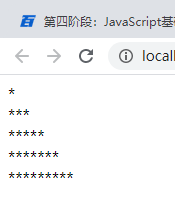
老师这段代码在控制台上显示的是等腰三角形,为什么在页面上用document.write为什么不显示空白的三角形,我也用</br>换行了呀,请老师帮我看一下,感谢!
var grade = 100;
switch (grade) {
    case grade>=90:{console.log("成绩优秀");}
    break;
     case grade<90 && grade>=80:{console.log("成绩良好");}
    break;
    case grade<80 && grade>=70:{console.log("成绩一般");}
    break;
    default:{console.log("成绩较差,望继续努力!");}
}
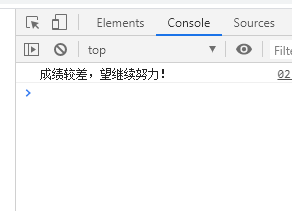
老师您好,我这段程序为什么执行出来的结果直接跳到最后一句了?
<!DOCTYPE html>
<html lang="en">
<head>
    <meta charset="UTF-8">
    <title>点击按钮,div移动</title>
    <style>
        div{
            width: 20px;
            height: 20px;
            background: pink;
            margin-top: 5px;
            position: absolute;
        }
    </style>
</head>
<body>
<button>点击移动div</button>
<div></div>
<script>
    //编写一个button。要求鼠标点击一次能够让页面中的某个div向右移动50像素
    //获取元素
    var but = document.querySelector('button');
    var div = document.querySelector('div');
    //点击button时
    but.onclick=function () {
        var left= div.style.left;
        div.style.left=left+'50px';
        console.log('点击一次')
    }
</script>
</body>
</html>
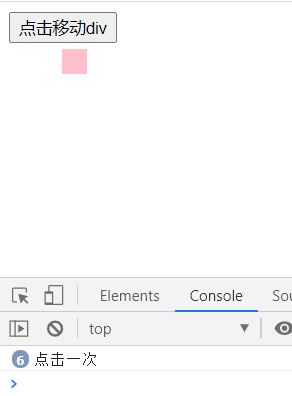
老师,为什么点击事件每次执行,但只有第一次div块移动了50px,后面执行时div块都没有移动?是哪里不对?
<!DOCTYPE html>
<html lang="en">
<head>
    <meta charset="UTF-8">
    <title>编写带有提示文字的滚动条</title>
    <style>
        div{
            width: 25px;
            height: 25px;
            border: 1px solid;
            line-height: 25px;
            text-align: center;
            position: absolute;
            display: none;
        }
    </style>
</head>
<body>
<input type="range" min="0" max="100" value="5">
<div></div>
<script>
    //获取元素
    var input = document.querySelector('input');
    var div = document.querySelector('div');
    var flag = false;
    //给input填加滑动事件
    input.onmousemove =function () {
        if (flag){
            //获取鼠标移动时坐标
            //console.log('(x,y):('+event.clientX+','+event.clientY+')');
            var divx = input.clientX;
            //当x坐标大于120(移出滚动条时,div隐藏)
            if (divx>120){
                div.style.display='none';
            }
            ////当x坐标小于14(移出滚动条时,div隐藏)
            if (divx<14){
                div.style.display='none';
            }
            else {
                //拖动时div块显示
                div.style.display='block';
            }
            //div的left属性赋值,div跟随上面的移动
            //style后面赋值必须为字符串
            div.style.left=event.clientX-12.5+'px';
            //把input实时的值赋到div块内
            div.innerHTML=input.value;
        }
    };
    //当鼠标按下时,div显示
    input.onmousedown=function () {
        flag=true;
        div.style.display='block';

    };
    //当鼠标抬起时,div隐藏
    input.onmouseup=function () {
        flag=false;
        div.style.display='none';
    }
</script>
</body>
</html>
老师,我想设置在鼠标移出滚动条范围后,鼠标按住时,div块也隐藏掉,但是并没有实现。这个应该如何实现?
<!DOCTYPE html>
<html lang="en">
<head>
    <meta charset="UTF-8">
    <title>每1s输出内容</title>
    <style>
        div{
            width: 100px;
            height: 100px;
            background: pink;
        }
    </style>
</head>
<body>
<div></div>

<script>
    //编写一个div,要求鼠标按下不抬起时。每隔1s输出一句'hello world‘;

    //获取div
    var div= document.querySelector('div');
    var flag = false;
    document.onmousedown=function(){
        if (flag==true){
            setInterval(function () {
                console.log('hello world')
            },1000);
        }
    };
    //鼠标按下时
    div.onmousedown=function () {
        flag=true;
    };
    //鼠标抬起时
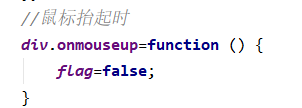
    div.onmouseup=function () {
        flag=false;
    }
</script>
</body>
</html>
老师,我想写
编写一个div,要求鼠标按下不抬起时。每隔1s输出一句'hello world‘;
现在完成了鼠标按下时每隔1s输出内容,但无法实现鼠标抬起时停止输出。
为什么我写的鼠标抬起时停止输出不生效呢?是哪里不对呢?
老师好,有三个小问题需要指导一下。
1、使用document.write()显示结果时,space空格不起作用,必须使用  才可以,console.log()刚好相反;
2、document.write()使用<br/>换行,console.log()使用"/n"换行,类似的区别很多么,有没有相关资料?
3、声明变量为数字时,系统默认这是一个整型,包括在自增自减等运算时都是按照整数处理的,有没有使用小数的情况?小数该怎么声明?
<!DOCTYPE html>
<html lang="en">
<head>
    <meta charset="UTF-8">
    <title>ppt练习题</title>
</head>
<body>
<!--按图完成效果,要求:
(1)导航静态实现
(2)数据内容动态实现
(3)样式要写在style中,用动态实现。-->
<script>
    var arr = ['全部','精华','分享','问答','招聘'];
    var ul = document.createElement('ul');
    var ul_style = document.createAttribute('style');
    ul_style.value = "list-style: none;padding: 0;margin: 0;";
    ul.setAttributeNode(ul_style);
    document.body.appendChild(ul);

    for (var i = 0; i<arr.length ;i++){
        var li = document.createElement('li');
        var li_style = document.createAttribute('style');
        li_style.value = "display: block;float: left;background: azure;margin: 0 5px;width:35px;height: 30px;line-height: 30px;text-align: center;";
        if (i== 0){
            li_style.value ='display: block;float: left;margin: 0 5px;width:35px;height: 30px;line-height: 30px;text-align: center;background:red;';
        }
        li.setAttributeNode(li_style);
        var a = document.createElement('a');
        a.innerHTML = arr[i];
        li.appendChild(a);
        ul.appendChild(li);
    }
</script>
</body>

</html>
老师,这个第一问是这个思路吗?
2、第二问数据内容动态实现是什么思路呢?是用循环和Input结合吗?把input在for循环中创建吗?判断条件的话应该怎么确定,能让他实现动态循环?
<!DOCTYPE html>
<html lang="en" xmlns="http://www.w3.org/1999/html">
<head>
    <meta charset="UTF-8">
    <title>数据解析</title>
</head>
<body>
    <form action="" method="get">
        姓名:<input type="text" name="userName"></br>
        年龄:<input type="text" name="age"></br>
        性别:<input type="text" name="sex"></br>
        <input type="submit">
    </form>
    <button>解析数据</button>
    <script>
        var but=document.querySelector("button");
        function dataParse(outInfo) {
            var obj = {};
            var infoStr = outInfo;
            //先获取?后面的内容
            var realInfo = infoStr.slice(1);
            var proArr = realInfo.split("&");
            for (var i = 0; i < proArr.length; i++) {
                var tempArr = proArr[i].split("=");
                obj[tempArr[0]] = tempArr[1];
            }
            return obj;
        }
        but.onclick=function(){
            var dataObj=dataParse(document.location.search);
            console.log(dataObj);
            }
    </script>
</body>
</html>

老师 我想请问一下,为什么我的也是用英文的,但是在控制台输出的时候却是加密的样子呢?
老师 您能全面一点么 三种引入的方式您这都没有讲啊。
老师,我想自定义一个alert()提示框,实现和alert一样的功能,提示框出现时页面代码停止执行,提示框关闭后页面代码继续执行。这个要怎么实现呢?
非常抱歉给您带来不好的体验!为了更深入的了解您的学习情况以及遇到的问题,您可以直接拨打投诉热线:
我们将在第一时间处理好您的问题!
关于
课程分类
百战未来微信公众号
百战未来微信小程序
©2014-2026百战汇智(北京)科技有限公司 All Rights Reserved 北京亦庄经济开发区科创十四街 赛蒂国际工业园网站维护:百战汇智(北京)科技有限公司 京公网安备 11011402011233号 京ICP备18060230号-3 营业执照 经营许可证:京B2-20212637




 为什么我写的鼠标抬起时停止输出不生效呢?是哪里不对呢?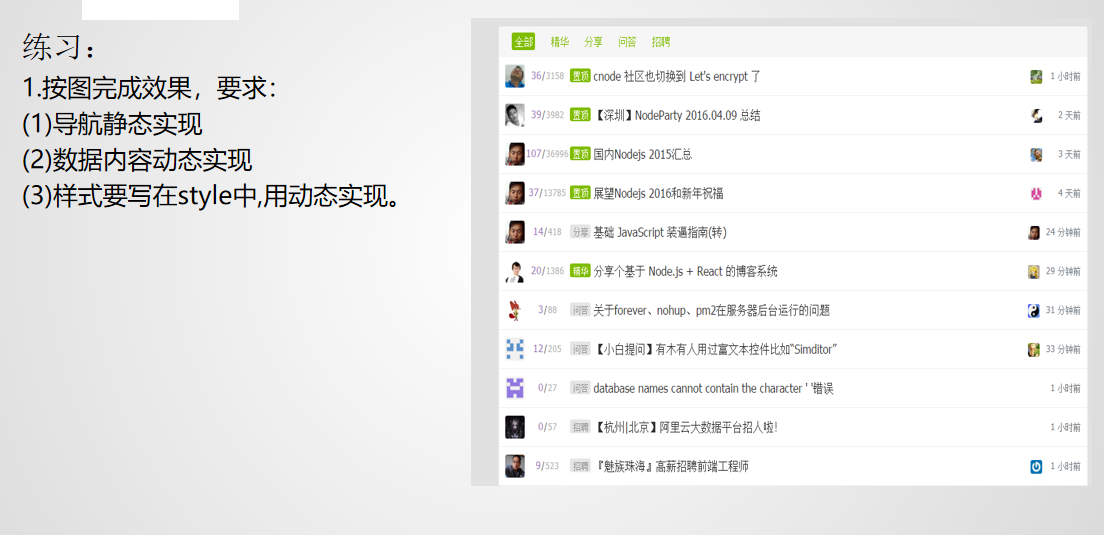


 京公网安备 11011402011233号