<!DOCTYPE html>
<html>
	<head>
		<meta charset="UTF-8">
		<title></title>
		<style>

			body{
				background-image: url(../img/12.jpg);
				background-repeat: no-repeat;
				background-size: 1600px 800px;
			}

			a{
				font-size: 25px;
				color: #ffffff;

			}
			.div1{
				width:300px;
				height: 200px;
				background: grey;
				text-align: center;
			}

			input{
				width: 40px;
				height: 30px;
			}
		</style>

		<script>

			var i=-1;
			function changebc(){

				var arr=['13.jpg','12.jpg'];
				i++;
				if(i<arr.length-1){
					i++;
				}else{
					i=0;
				}
				document.body.style.backgroundImage="url(../img/"+arr[i]+")"
			}


		function chengove(){
			//获得div对象
				var div=document.getElementById("div_1");
				div.style.marginTop="300px";
				div.style.marginLeft="400px";
		}

		</script>

	</head>
	<body>
		<a href="javascript:changebc()">更换主题</a>
		 <div class="div1" id="div_1">

		 	<h3>我是不是你的小可爱</h3>
		 	<input type="button" value="是" />
		 	<input type="button" value="否" onmouseover="chengove" />

		 </div>
	</body>
</html>
鼠标放在“否”上不能实现框体移动
老师,我这个用Hbuilder写的用IE打开一直是空白,但是用notepad写,就可以打开北京尚学堂的网页,这是怎么回事呢
<!DOCTYPE html>
<html>
	<head>
		<meta charset="utf-8" />
		<title></title>

		<!--搜索引擎优化-->
		<meta name="author"  content="朱自清,张三"/>
		<meta name="description" content="盼望着盼望着东风来了" />
		<meta name="keywords" content="东风,盼望"/>
		<!--自动刷新网页-->
		<meta http-equiv="refresh" content="5;http://www.bjsxt.com"/>
	</head>
	<body>

	</body>
</html>
function check(id,reg){
				var user = document.getElementById(id);
				var value = user.value;
				var alt = user.alt;
				var span = document.getElementById(id + "Span");
				if(value == null || value == ""){
					span.style.color = "red";
					span.innerText = alt + "不能为空";
				}else if(reg.test(value)){
					span.style.color = "green";
					span.innerText = alt + "输入正确";
				}else{
					span.style.color = "red";
					spam.innerText = alt + "输入错误";
				}
			}
function checkTelephone(){
				var reg = /^d{3}-d{8}|d{4}-{7,8}$/;
				check("telephone",reg);
			}
<tr height="30px">
					<td>手机号:</td>
					<td>
						<input type="text" alt="手机号" id="telephone" onblur="checkTelephone()"/>
						<span id="telephoneSpan"></span>
					</td>
				</tr>
只能验证是否为空其他的都没有效果,哪里出问题了?
老师,为什么我的浮动样式显现不出来,当时学浮动的时候就可以,,,
老师,请帮我看一下附后代码,我一直没找到哪里出错了,它不能再控制台输出
<!DOCTYPE html>
<html>
	<head>
		<meta charset="utf-8">
		<title></title>
		<script src="js/jquery-1.9.1.js" charset="UTF-8" type="text/javascript">

		</script>
		<script type="text/javascript">
			$(function(){
				$("#bu1").click(function(){
					//获得div元素对象
					var div=$("#div1");
			//2.获取文本内容
			//方式一
			var ht=div.html();
			console.log(hr);
			//方式二
			//var te=dic.text();
			//console.log(te)
				})
			})
		</script>
	</head>
	<body>
		<input type="button" name="bul" id="bul" value="操作元素内容" />
		<hr />
		<div id="div1">
			<span >
				北京尚学堂
			</span>
		</div>
		<input type="text" name="inp1" id="inp1" value="" />
	</body>
</html>
a连接标签是干嘛的????????????????????
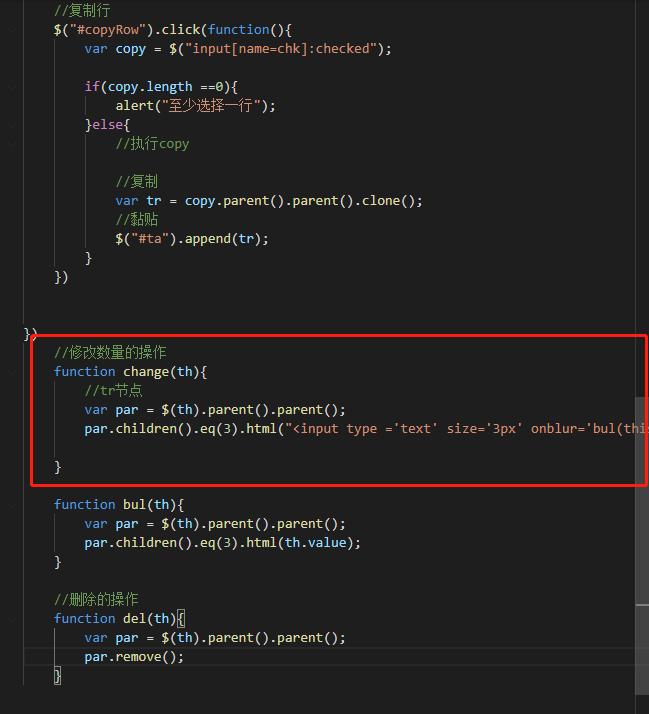
之前都是写在$(function(){})里面的,可以进行单击响应。为什么到了“修改数量”操作写在外面,用了onclick=“”来书写。
我是否仍然可以写在$(function(){})里面
老师,这里面那些是固定写法,那些是我们自己写的啊,http-equiv和refresh都是标签吗
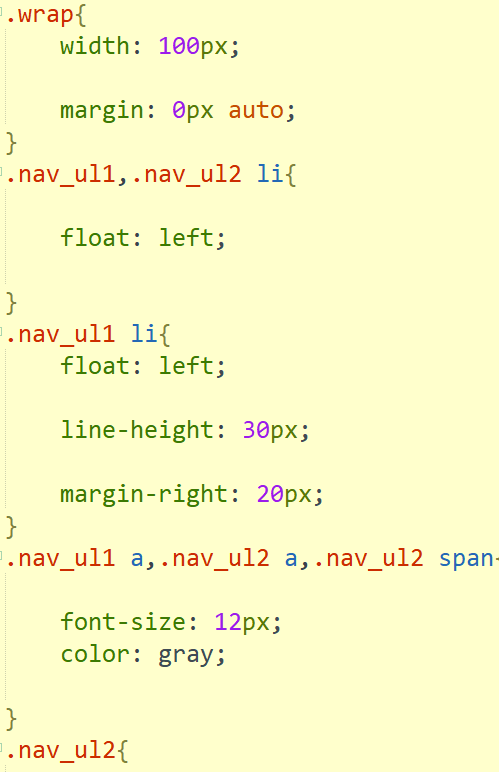
老师,这一节里面这块代码中,是不是只能写 .nav_ul2 span而不能写nav_ul2>span?
这个'>'是只能用在ul里面第一个标签上面吗?然后更里面的标签只能用空格了?
该咋理解?
老师讲 Frameset 标签手机客户端体验度不好,是因为,在Frameset标签下,不好用响应式处理吗?Frameset标签能搞定成响应式布局吗?或者自适应形式。
老师,做HTML5,谷歌、火狐、IE 和 苹果 浏览器都需要下载吗
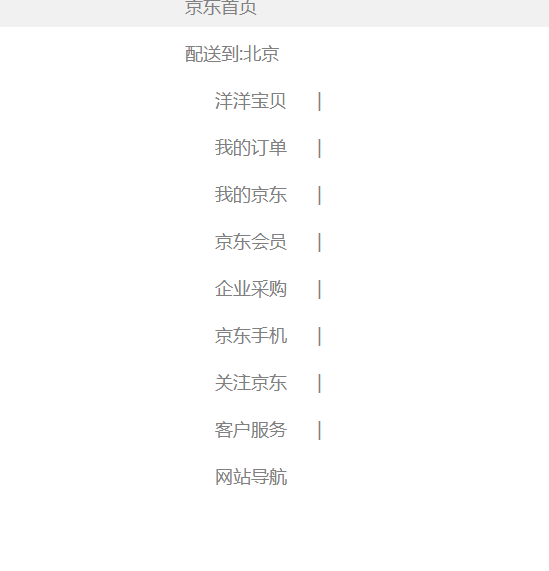
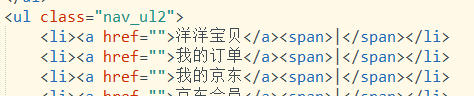
老师,我竖线为什么不居中嗯。
.nav{
	width: 100%;
	height: 30px;
	background-color: #F1F1F1;

}
.warp{
	width: 1000px;
	margin: 0px auto;

}
.nav_ul1,.nav_ul2 li{
	float: left;

}
.nav_ul1 li{
	float: left;
	line-height:30PX ;
	margin-right: 20px;
}
.nav_ul1 a,.nav_ul2 a,.nav_ul2 span{
	font-size: 12PX;
	color: gray;
}
.nav_ul2{
	float: right;
}
.nav_ul2 li,.nav_ul2 span{

	line-height: 30px;
	margin-right: 10px ;
}
.nav a:hover{
	color: red;
}
<!DOCTYPE html>
<html>
	<head>
		<meta charset="utf-8">
		<title></title>
		<style>
			body{
						  background-image: url(img/bjsky.jpg);

						  background-repeat: no-repeat;

						  background-size: 1600px  800px;


						}
			a{
				font-size: 25px;
				color: #ffffff;
			}
		</style>
		<script>

			function change(){
				var i = -1;
				var arr=['mayun.jpg','bjsky.jpg','simple.jpg','sxt.jpg','zgc.jpg'];

				i++;
				// if(i < arr.length -1){
				// 	i++;

				// }else{
				// 	i = 0;
				// }
				document.body.style.backgroundImage = "url(img/"+arr[i]+")"
			}

		</script>
	</head>

	<body>
		<a href="javascript:change()">点击更改壁纸</a>
	</body>
</html>
为什么我的代码语言没错啊,和老师打的一模一样,但是我只能更改一次壁纸,不能改两次
这什么时候会用这种方式去创建元素啊?
老师为啥我跳转失败了呀,Hbuilder还有NotePad++都跳转不了 都是空白页
非常抱歉给您带来不好的体验!为了更深入的了解您的学习情况以及遇到的问题,您可以直接拨打投诉热线:
我们将在第一时间处理好您的问题!
关于
课程分类
百战程序员微信公众号
百战程序员微信小程序
©2014-2026百战汇智(北京)科技有限公司 All Rights Reserved 北京亦庄经济开发区科创十四街 赛蒂国际工业园网站维护:百战汇智(北京)科技有限公司 京公网安备 11011402011233号 京ICP备18060230号-3 营业执照 经营许可证:京B2-20212637



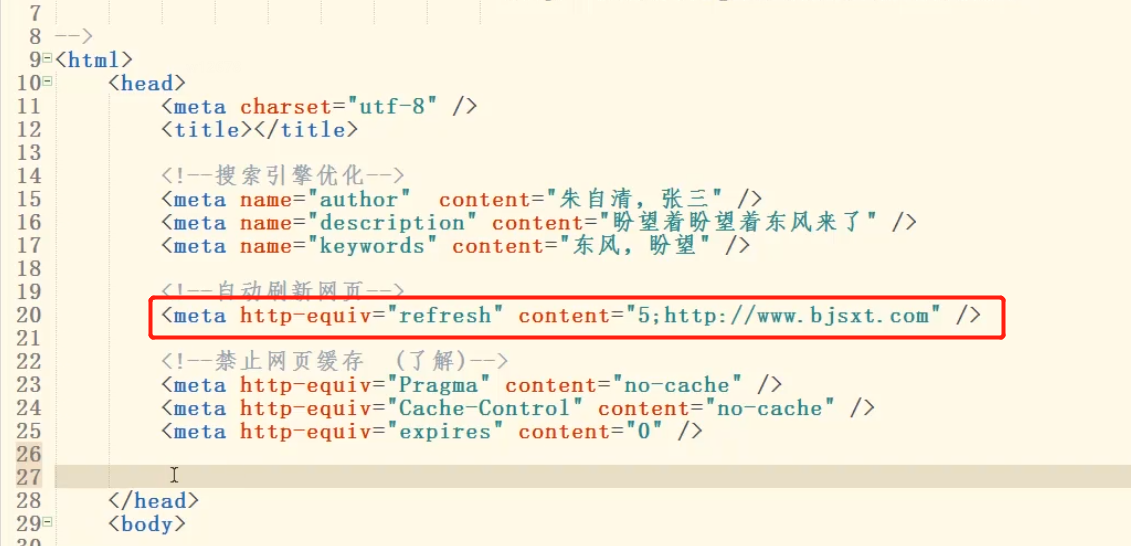 老师,这里面那些是固定写法,那些是我们自己写的啊,http-equiv和refresh都是标签吗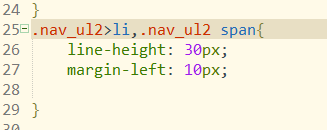



 京公网安备 11011402011233号