图片文件夹怎么导入到python项目里面去
怎么能设置我的pycharm也可以这样显示这些函数在这里
老师你好:
我已经完成坦克大战的学习,游戏测试也成功,
但有一些原理不太明白,希望老师解答
我的问题全部写在了Word文档中,
下载以下文件即可:
坦克大战的疑惑需要解答
坦克大战的疑惑需要解答.zip
MainGame.TANK_P1.direction = "L"
MainGame.TANK_P1.direction = "R"
MainGame.TANK_P1.direction = "U"
MainGame.TANK_P1.direction = "D"
self.images = {
    'U':pygame.image.load('img\p1tankU.gif'),
    'D':pygame.image.load('img\p1tankD.gif'),
    'L':pygame.image.load('img\p1tankL.gif'),
    'R':pygame.image.load('img\p1tankR.gif')
}
前面将坦克四个方向的状态的图片存储到字典中,U、D、L、R是字典的键。MainGame.TANK_P1.dieection="X"应该是对坦克再按键盘按键之后对坦克的图片进行了替换吧?
还有个基础问题,在同一个模块中不同类之间为什么能调用实例方法,如:
在tank18.py中,主逻辑类MainGame中的实例方法blitEnemyTank()调用了Tank类中的实例方法displayTank()
在tank18.py中,爆炸效果总是提示下图异常,实在是找不到哪里出问题了,麻烦老师帮忙解答一下
tank.rar
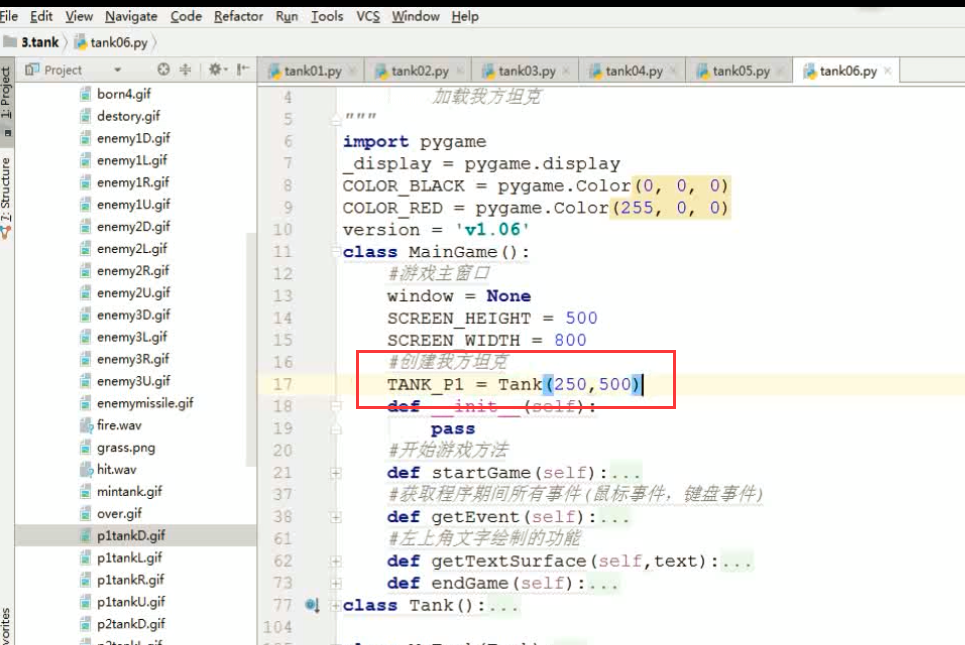
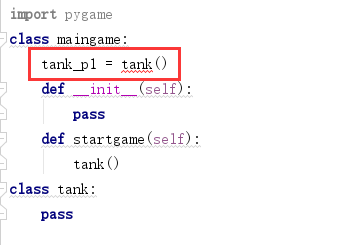
如下图,视屏中可以在类属性处调用其他类,我自己在写程序是只能在类方法中调用其他类,代码如下(此处已将代码删减到最简):
import pygame
class maingame:
    tank_p1 = tank()
    def __init__(self):
        pass
    def startgame(self):
        tank()
class tank:
    pass
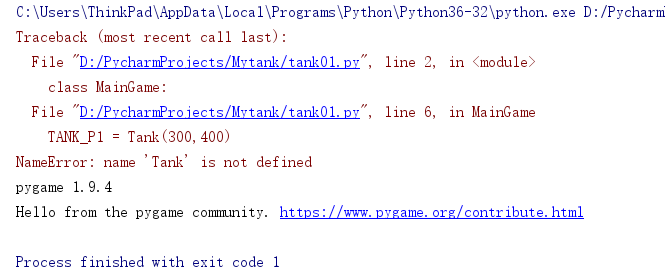
以上代码报错如下:
老师,可以发一下坦克的图片吗??????
.......................................
下图中,
MainGame.window.fill(COLOR_BLACK)这句话是由官网上pygame.Surface.fill这个函数演变得到的,我没搞明白这两者是怎么联系起来的??
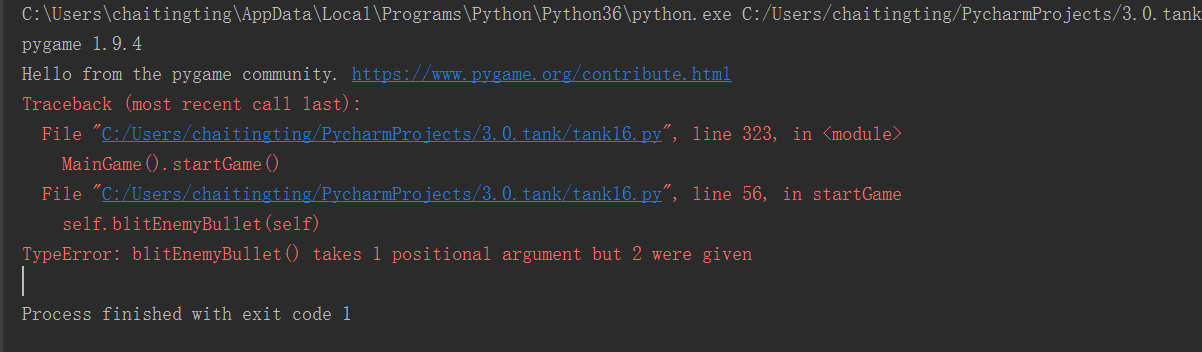
这个问题是出在哪里了。。。
。。。。。。。。。。。。。。。。。。。。。。
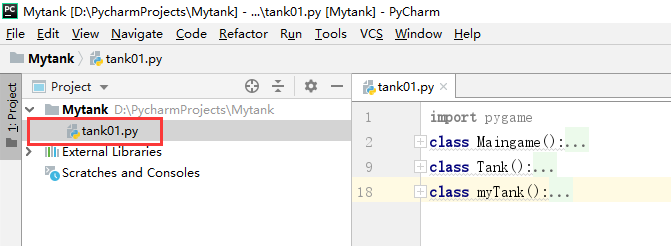
视频中模块下创建类就会出现下拉箭头,如下图:
我自己操作没有出现下拉箭头,如下图,是我哪里操作有误吗???
请问老师,这个__all__究竟有什么作用,用 * 明明就可以导入所有功能了·,为啥要用个__all__列表来一个一个添加呢,如果只想导入少量几个功能,只需要在import 模块 import后面加就行了,没想明白__all__存在的意义
看了别的同学提问,经测试:通过这样的修改,可以保证坦克在更换方向后,前一个方向键还没有松开,松开前一个方向键后导致坦克停止的问题;
解决别人的问题,也是一种提升,希望老师帮忙看下,这样修改,会不会有什么bug
if event.type == pygame.KEYUP:
    #如果是方向键,才更改移动开关,但这样会导致无法连续更改方向键,只要有一个方向键松开就会停止
    # if event.key == pygame.K_LEFT or event.key == pygame.K_RIGHT or event.key == pygame.K_UP or event.key == pygame.K_DOWN:
    #     MainGame.TANK_P1.stop = True
    #解决转向后,松开转向前的按键停止的问题,先判断方向,然后再判断是否该方向 的按键松开,只有同时满足才改变开关状态
    if MainGame.TANK_P1.direction == 'L' and event.key == pygame.K_LEFT:
        MainGame.TANK_P1.stop = True
    elif MainGame.TANK_P1.direction == 'R' and event.key == pygame.K_RIGHT:
        MainGame.TANK_P1.stop = True
    elif MainGame.TANK_P1.direction == 'U' and event.key == pygame.K_UP:
        MainGame.TANK_P1.stop = True
    elif MainGame.TANK_P1.direction == 'D' and event.key == pygame.K_DOWN:
        MainGame.TANK_P1.stop = True
pygametimerandom
_display = pygame.display
COLOR_BLACK = pygame.Color()
COLOR_RED = pygame.Color()
version = MainGame():
    window = SCREEN_HEIGHT = SCREEN_WIDTH = TANK_P1 = EnemyTank_list = []
    EnemTank_count = Bullet_list = []
    Enemy_bullet_list = []
    ():
        ():
        _display.init()
        MainGame.window = _display.set_mode([MainGame.SCREEN_WIDTHMainGame.SCREEN_HEIGHT])
        MainGame.TANK_P1 = Tank()
        .creatEnemyTank()
        _display.set_caption(+version)
        :
            MainGame.window.fill(COLOR_BLACK)
            .getEvent()
            MainGame.window.blit(.getTextSurface(%(MainGame.EnemyTank_list))())
            MainGame.TANK_P1.displayTank()
            .blitEnemyTank()
            MainGame.TANK_P1 MainGame.TANK_P1.stop:
                MainGame.TANK_P1.move()
            .blitBullet()
            .blitEnemyBullet()
            time.sleep()
            _display.update()
    ():

        top = speed = random.randint()
        i (MainGame.EnemTank_count):
            left = random.randint()
            eTank = EnemyTank(left*topspeed)
            MainGame.EnemyTank_list.append(eTank)
    ():
        eTank MainGame.EnemyTank_list:
            eTank.displayTank()
            eTank.randMove()
            eBullet = eTank.shot()
            MainGame.Enemy_bullet_list.append(eBullet)
    ():
        bullet MainGame.Bullet_list:
            bullet.live:
                bullet.displayBullet()
                bullet.bulletMove()
            :
                MainGame.Bullet_list.remove(bullet)
    ():
        eBullet MainGame.Enemy_bullet_list:
            eBullet.live:
                eBullet.displayBullet()
                eBullet.bulletMove()
            :
                MainGame.Bullet_list.remove(eBullet)

    ():
        eventList = pygame.event.get()
        event eventList:
            event.type == pygame.QUIT:
                .endGame()
            event.type == pygame.KEYDOWN:
                event.key == pygame.K_LEFT:
                    ()
                    MainGame.TANK_P1.direction = MainGame.TANK_P1.stop = event.key == pygame.K_RIGHT:
                    ()
                    MainGame.TANK_P1.direction = MainGame.TANK_P1.stop = event.key == pygame.K_UP:
                    ()
                    MainGame.TANK_P1.direction = MainGame.TANK_P1.stop = event.key == pygame.K_DOWN:
                    ()
                    MainGame.TANK_P1.direction = MainGame.TANK_P1.stop = event.key == pygame.K_SPACE:
                    ()
                    (MainGame.Bullet_list) < :
                        m = Bullet(MainGame.TANK_P1)
                        MainGame.Bullet_list.append(m)
                    :
                        ()
                    (%(MainGame.Bullet_list))
            event.type == pygame.KEYUP:
                event.key == pygame.K_LEFT event.key == pygame.K_RIGHT event.key == pygame.K_UP event.key == pygame.K_DOWN:
                    MainGame.TANK_P1.stop = (text):
        pygame.font.init()
        font = pygame.font.SysFont()
        textSurface = font.render(textCOLOR_RED)
        textSurface
    ():
        ()
        ()
Tank():
    (lefttop):
        .images = {
            :pygame.image.load():pygame.image.load():pygame.image.load():pygame.image.load()
        }
        .direction = .image = .images[.direction]
        .rect = .image.get_rect()
        .rect.left = left
        .rect.top = top
        .speed = .stop = ():
        .direction == :
            .rect.left > :
                .rect.left -= .speed
        .direction == :
            .rect.left + .rect.height < MainGame.SCREEN_WIDTH:
                .rect.left += .speed
        .direction == :
            .rect.top > :
                .rect.top -= .speed
        .direction == :
            .rect.top + .rect.height < MainGame.SCREEN_HEIGHT:
                .rect.top += .speed
    ():
        Bullet()
    ():
        .image = .images[.direction]
        MainGame.window.blit(.image.rect)
MyTank(Tank):
    ():
        EnemyTank(Tank):
    (lefttopspeed):
        .images = {
            : pygame.image.load(): pygame.image.load(): pygame.image.load(): pygame.image.load()
        }
        .direction = .randDirection()
        .image = .images[.direction]
        .rect = .image.get_rect()
        .rect.left = left
        .rect.top = top
        .speed = speed
        .stop = .step = ():
        num = random.randint()
        num == :
            num == :
            num == :
            num == :
            ():
        .step <= :
            .direction = .randDirection()
            .step = :
            .move()
            .step -= Bullet():
    (tank):
        .image = pygame.image.load()
        .direction = tank.direction
        .rect = .image.get_rect()
        .direction == :
            .rect.left = tank.rect.left + tank.rect.width/- .rect.width/.rect.top = tank.rect.top - .rect.height
        .direction == :
            .rect.left = tank.rect.left + tank.rect.width / - .rect.width / .rect.top = tank.rect.top + tank.rect.height
        .direction == :
            .rect.left = tank.rect.left - .rect.width / - .rect.width / .rect.top = tank.rect.top + tank.rect.width / - .rect.width / .direction == :
            .rect.left = tank.rect.left + tank.rect.width
            .rect.top = tank.rect.top + tank.rect.width / - .rect.width / .speed = .live = ():
        .direction == :
            .rect.top > :
                .rect.top -= .speed
            :
                .live = .direction == :
            .rect.top < MainGame.SCREEN_HEIGHT - .rect.height:
                .rect.top += .speed
            :
                .live = .direction == :
            .rect.left > :
                .rect.left -= .speed
            :
                .live = .direction == :
            .rect.left < MainGame.SCREEN_WIDTH - .rect.width:
                .rect.left += .speed
            :
                .live = ():
        MainGame.window.blit(.image.rect)
Explode():
    ():
        ():
        Wall():
    ():
        ():
        Music():
    ():
        ():
        MainGame().startGame()
检查了好几次,每次到了8分38秒此时效果时候就弹出下面的提示,该怎么处理呢?
非常抱歉给您带来不好的体验!为了更深入的了解您的学习情况以及遇到的问题,您可以直接拨打投诉热线:
我们将在第一时间处理好您的问题!
关于
课程分类
百战程序员微信公众号
百战程序员微信小程序
©2014-2025百战汇智(北京)科技有限公司 All Rights Reserved 北京亦庄经济开发区科创十四街 赛蒂国际工业园网站维护:百战汇智(北京)科技有限公司 京公网安备 11011402011233号 京ICP备18060230号-3 营业执照 经营许可证:京B2-20212637



 怎么能设置我的pycharm也可以这样显示这些函数在这里


 .......................................
 这个问题是出在哪里了。。。


 京公网安备 11011402011233号