使用弹性盒子后margin和padding还有效果吗
我按标准书写的标准盒模型,然后就是在我浏览器上运行打开之后宽度溢出了,border和padding也没有数值我是什么没安装吗
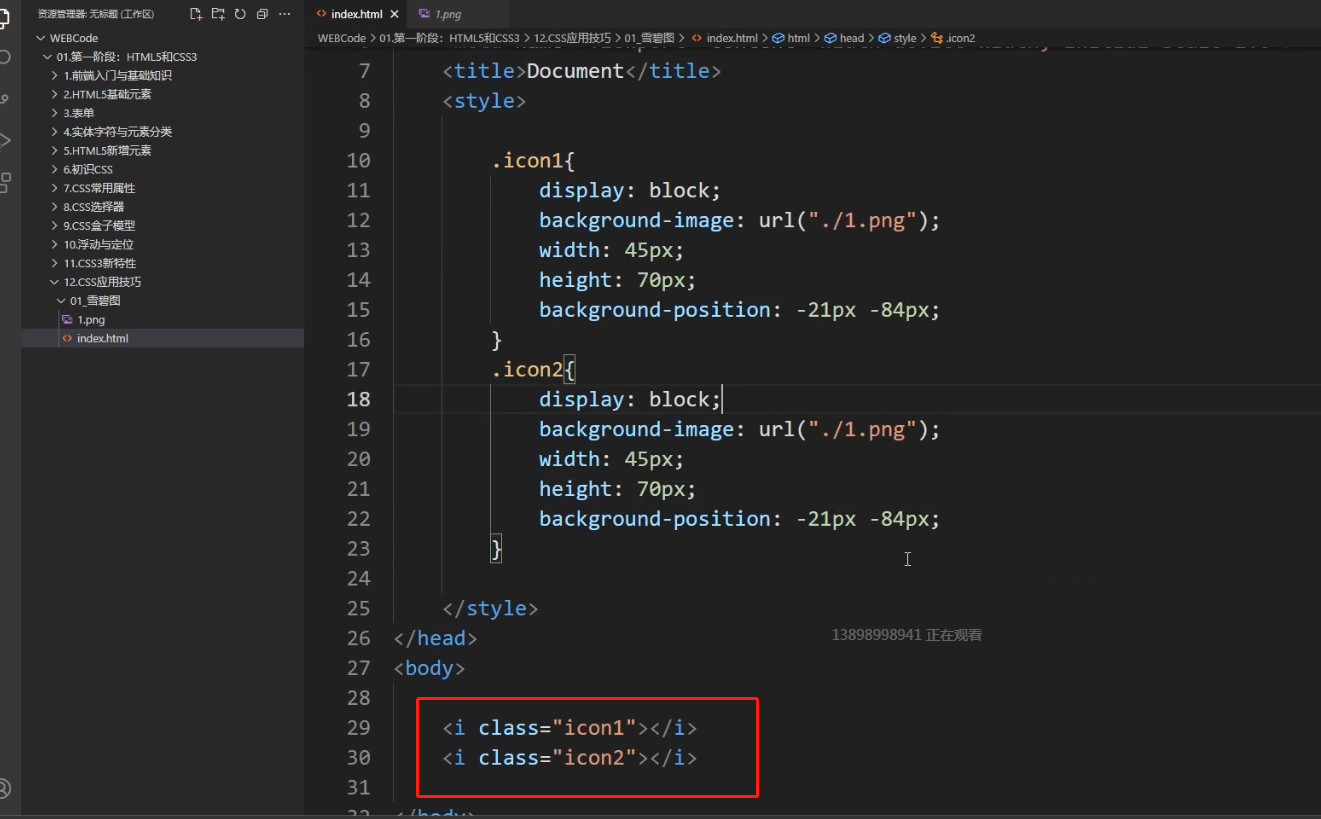
不太明白这地方没有文字,放的图片为啥用i标签呢?是不是也可以用其他标签呢
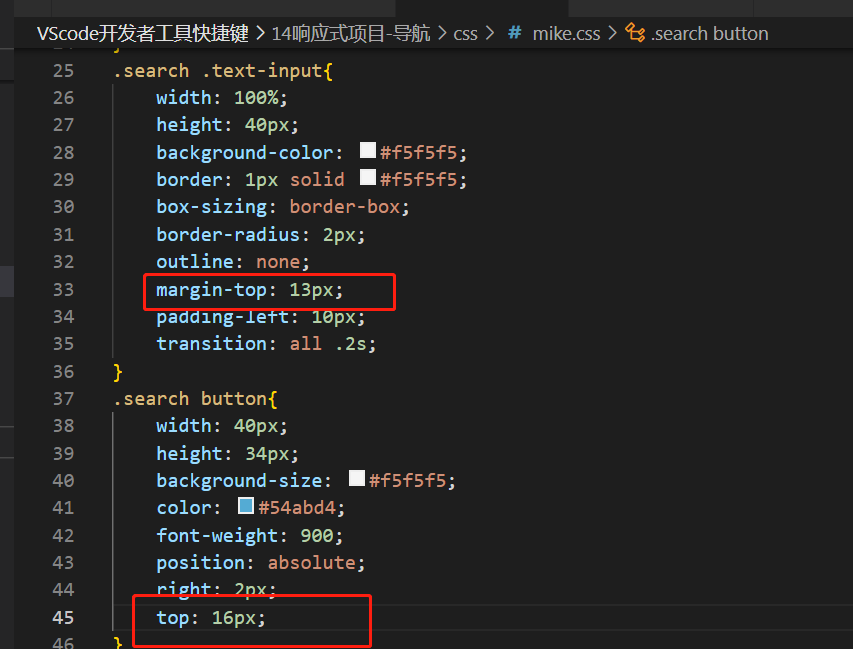
input距离上面是13px,button按钮距离上面为啥是16px,他两不是一边齐的吗,16是怎么计算出来的?
媒体查询,检查手机模式,在这里谷歌浏览器dimensions: iphone6/7/8,没iphone6/7/8,只有iphone se,iphone xr,iphone 12 pro 需要选择哪一个?
两个大小不一样的图可以用vertical-align实现顶部对齐和居中对齐吗
还是说只能是文本元素才能用
<!DOCTYPE html>
<html>
<head>
    <meta charset="UTF-8">
    <meta http-equiv="X-UA-Compatible" content="IE=edge">
    <meta name="viewport" content="width=device-width, initial-scale=1.0">
    <title>Document</title>
    <style>
       video{
            width: 300px;
            height: 300px;
        }
    </style>
</head>
<body>
    <div>
        <video src="games.mp4" muted controls autoplay ></video>
        <audio src="returns.mp3" controls autoplay></audio>
    </div>
</body>
</html>
打开网页,为什么音频不能自动播放呢
<!DOCTYPE html>
<html lang="en">
<head>
    <meta charset="UTF-8">
    <meta http-equiv="X-UA-Compatible" content="IE=edge">
    <meta name="viewport" content="width=device-width, initial-scale=1.0">
    <title>Document</title>
    <style>
       video{
            width: 300px;
            height: 300px;
        }
    </style>
</head>
<body>
    <div>
        <video src="games.mp4" muted controls autoplay ></video>
        <audio src="returns.mp3" controls autoplay></audio>
    </div>
</body>
</html>
打开网页,为什么音频不能自动播放呢
什么情况下需要写name,和value属性;单选和复选框不写value属性,可以吗?
<!DOCTYPE html>
<html lang="en">
<head>
    <meta charset="UTF-8">
    <meta http-equiv="X-UA-Compatible" content="IE=edge">
    <meta name="viewport" content="width=device-width, initial-scale=1.0">
    <title>Document</title>

    <style>
        .nav{
            width: 100%;
            height: 60px;
            background-color: black;
        }

        .nav ul{
            overflow: hidden;
            clear: both;
        }

        .nav ul li{
            list-style: none;
            float: left;
            padding: 20px 25px;
        }

        .nav ul li a{
            color: aqua;
            text-decoration: none;
            font-size: 30px;
        }
        .box{
            width: 100%;
            height: 300px;
            position: absolute;
            left: 0%;
            display:none;
        }

        .nav li:hover>.box{
            display: block;
        }


    </style>

</head>
<body>

    <div class="nav">
        <ul>
            <li><a href="#">首页</a>
            <div class="box" style="background-color: red;"></div><!--这个就是下拉列代表的容器-->
        </li>
            <li><a href="#">手机</a>
            <div class="box" style="background-color: gold;"></div>
        </li>


            <li><a href="#">配件</a>
            <div class="box" style="background-color: green;"></div>
        </li>

            <li><a href="#">电脑</a>
            <div class="box" style="background-color: blanchedalmond;"></div>
        </li>
            <li><a href="#">手表</a>
            <div class="box" style="background-color: blue;"></div>
        </li>
        </ul>
    </div>

</body>
</html>
视频里vertical-align这个属性设给图片如果设给文本可以达到同样的效果吗
下拉列表中的option属性中,可不可以不写value属性,直接写要下拉的文本?
<!DOCTYPE html>
<html lang="en">
<head>
    <meta charset="UTF-8">
    <meta http-equiv="X-UA-Compatible" content="IE=edge">
    <meta name="viewport" content="width=device-width, initial-scale=1.0">
    <title>Document</title>
    <link rel="stylesheet" href="css1/reset.css">
    <style>
        .box{
            box-sizing: border-box;
            width: 234px;
            height: 320px;
            padding: 20px 0;
            position: relative;
            text-align: center;
            background-color: coral;
            margin: 10px;
        }
        .box img{
            width: 80px;
            height: 160px;
            position: absolute;
            top: 21px;
            left: 77px;


        }
        .box>img:first-child{
            z-index: 10;
        }
        .box2{
            position: absolute;
            top:204px;
            background-color: yellow;
            width: 100%;
            height: 102px;
            text-align: center;
        }
        p{margin-bottom: 1px ;
      }
      .box2>p:last-child{
          margin-top: 10px;
      }

      .box:hover>img:first-child{
          left:40px
      }
      .box:hover>img:last-child{
       left:114px
      }
    </style>
</head>
<body>

<div class="box">
    <img src="images/position练习3.jpg" alt="">
    <img src="images/22.jpg" alt="" class="i2">
       <div class="box2">
          <p>黑鲨4S</p>
          <p>磁动力升降肩键</p>
          <p>2699元起</p>

    </div>
</div>
</body>
</html>
老师为啥用这个 last-child选择器不生效 用类选择器.i2就会生效? 要有三个img才可以使用last-child嘛?
.box:hover>img:last-child{
       left:114px
      }
opacity透明度这个属性一般用在什么场景呢 我感觉改颜色也能达到效果吧
老师,您好。可不可以子元素先display:none,然后移入父级,子级显示在定位。我的作业就是按照这个做法做的没有用父级的overflow:hidden。老师这样可以吗?
<!DOCTYPE html>
<html lang="en">

<head>
    <meta charset="UTF-8">
    <meta name="viewport" content="width=device-width, initial-scale=1.0">
    <title>移入显示</title>
    <style>
        .dad {
            width: 200px;
            height: 300px;
            background: tomato;
            position: relative;
        }

        .son {
            display: none;
        }

        .dad:hover>.son {
            display: block;
            position: absolute;
            bottom: 0;
            left: 0;
            width: 100%;
            height: 50px;
            background: skyblue;
        }
    </style>

</head>

<body>
    <div class="dad">
        <div class="son">son</div>
    </div>
</body>

</html>
非常抱歉给您带来不好的体验!为了更深入的了解您的学习情况以及遇到的问题,您可以直接拨打投诉热线:
我们将在第一时间处理好您的问题!
关于
课程分类
百战程序员微信公众号
百战程序员微信小程序
©2014-2026百战汇智(北京)科技有限公司 All Rights Reserved 北京亦庄经济开发区科创十四街 赛蒂国际工业园网站维护:百战汇智(北京)科技有限公司 京公网安备 11011402011233号 京ICP备18060230号-3 营业执照 经营许可证:京B2-20212637



 不太明白这地方没有文字,放的图片为啥用i标签呢?是不是也可以用其他标签呢
 input距离上面是13px,button按钮距离上面为啥是16px,他两不是一边齐的吗,16是怎么计算出来的?

 京公网安备 11011402011233号