会员可以在此提问,百战未来老师有问必答
对大家有帮助的问答会被标记为“推荐”
看完课程过来浏览一下别人提的问题,会帮你学得更全面
截止目前,同学们一共提了 135131个问题

style>
        .box{
            width: 234px;
            height: 300px;
            background-color: pink;
            position: relative;
            overflow: hidden;
        }
        .box1{
            width: 100%;
            height: 76px;
            background-color: orange;
            /*绝对定位  相对于已经定位的父元素定位*/
            position: absolute;
            /*据父元素上面的距离为300px*/
            top: 300px;
            /*据父元素的左侧距离为0*/
            left: 0px;
        }
        /*鼠标悬停在box上,子代box1*/
        .box:hover>.box1{
           /*据父元素上面的距离变为224*/
            top: 224px;
        }
        .box2{
            width: 303px;
            height: 375px;
            background-color: red;
            position: relative;
        }
        .box2>img{
            width: 100%;
            height: 100%;
        }
        .box3{
            width: 100%;
            height: 100%;
            background-color: salmon(0,0,0,.2);
            position: absolute;
            top: 0px;
            left: 303px;
        }
        .box2:hover>.box3{
            left: 0;
        }
    </style>
</head>
<body>
    <div class="box">
        <div class="box1"></div>
    </div>
    <div class="box2">
        <img src="img/370ad36f-425c-453a-b406-ccb2a0dffeec.jpg" alt="">
        <div class="box3"></div>
    </div>
</body>
</html>

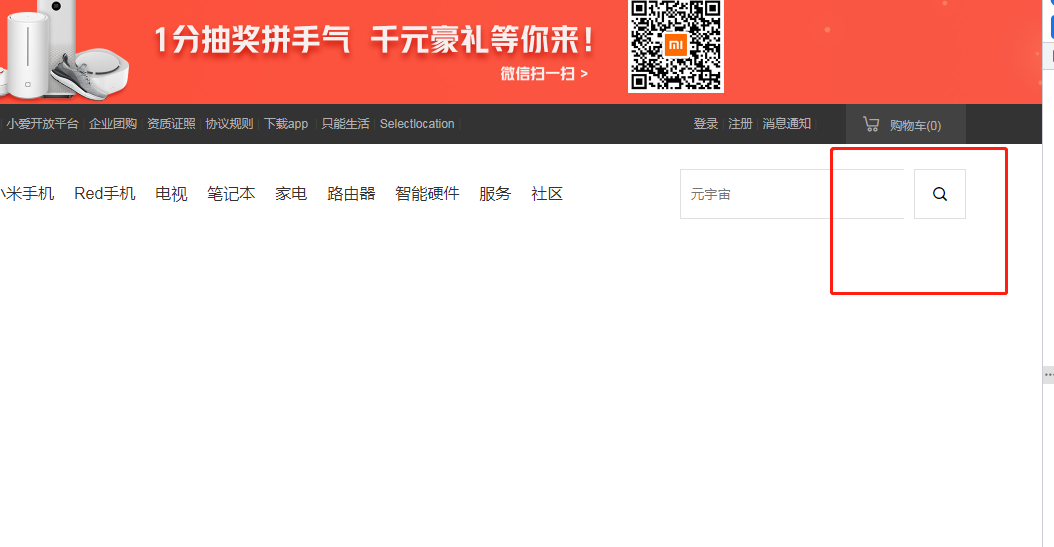
老师,我这个代码哪里不对吗?为啥达不到老师说的效果


WEB前端全系列/第一阶段:HTML5+CSS3模块/CSS常用属性 511楼
WEB前端全系列/第一阶段:HTML5+CSS3模块/商城官网项目 512楼
WEB前端全系列/第一阶段:HTML5+CSS3模块/前端入门与基础知识 514楼

老师这节课的第二个实操,其实也有第二种方法,全部浮动向左好理解些。

<!DOCTYPE html>

<html lang="en">


<head>

    <meta charset="UTF-8">

    <meta http-equiv="X-UA-Compatible" content="IE=edge">

    <meta name="viewport" content="width=device-width, initial-scale=1.0">

    <title>Document</title>


    <style>

        /*清空浏览器默认边距*/

        * {

            margin: 0;

            padding: 0;

        }

        .container {

            height: 600px;

            width: 600px;

        }

        .left {

            float: left;

            height: 600px;

            width: 200px;

            background-color: rgb(205, 196, 255);

        }

        .right {

            float: left;

            height: 600px;

            width: 400px;

            background-color: bisque;

        }

        .top {

            height: 300px;

            width: 400px;

            background-color: rgb(28, 162, 196);

        }

        .bottom-left {

            float: left;

            height: 300px;

            width: 200px;

            background-color: rgb(196, 28, 196);

        }

        .bottom-right {

            float: left;

            height: 300px;

            width: 200px;

            background-color: rgb(109, 196, 28);

        }

    </style>

</head>


<body>

    <div class="container">

        <div class="left"></div>

        <div class="right">

            <div class="top"></div>

            <div class="bottom-left"></div>

            <div class="bottom-right"></div>

        </div>

    </div>

</body>


</html>


WEB前端全系列/第一阶段:HTML5+CSS3模块/初识CSS 516楼
WEB前端全系列/第一阶段:HTML5+CSS3模块/实体字符与元素分类 517楼

你好老师,我这除了h3已经设置高度的,其他内容怎么撑不开高度显示不出来呐

<div class="content">

        <div class="wrap">


        <!-- 手机模块开始 -->


            <div class="phone">

                <h3 class="title">手机</h3>

                <div class="phone-box">

                    <div class="phone-box-left">

                        <a href="#"><img src="./images/phone_left.jpg" alt=""></a>

                    </div>

                    <div class="phone-box-right">

                        <div class="item">

                            <a href="#">

                                <img src="./images/phone-right.jpg" alt="" class="item-img">

                                <p class="item-name">小米10至尊纪念版</p>

                                <p class="item-desc">120X 变焦/120W秒充/120Hz屏幕</p>

                                <p class="item-price">5299元起</p>

                            </a>

                        </div>

                        <div class="item">

                            <a href="#">

                                <img src="./images/phone-right.jpg" alt="" class="item-img">

                                <p class="item-name">小米10至尊纪念版</p>

                                <p class="item-desc">120X 变焦/120W秒充/120Hz屏幕</p>

                                <p class="item-price">5299元起</p>

                            </a>

                        </div>

                        <div class="item">

                            <a href="#">

                                <img src="./images/phone-right.jpg" alt="" class="item-img">

                                <p class="item-name">小米10至尊纪念版</p>

                                <p class="item-desc">120X 变焦/120W秒充/120Hz屏幕</p>

                                <p class="item-price">5299元起</p>

                            </a>

                        </div>

                        <div class="item">

                            <a href="#">

                                <img src="./images/phone-right.jpg" alt="" class="item-img">

                                <p class="item-name">小米10至尊纪念版</p>

                                <p class="item-desc">120X 变焦/120W秒充/120Hz屏幕</p>

                                <p class="item-price">5299元起</p>

                            </a>

                        </div>

                        <div class="item">

                            <a href="#">

                                <img src="./images/phone-right.jpg" alt="" class="item-img">

                                <p class="item-name">小米10至尊纪念版</p>

                                <p class="item-desc">120X 变焦/120W秒充/120Hz屏幕</p>

                                <p class="item-price">5299元起</p>

                            </a>

                        </div>

                        <div class="item">

                            <a href="#">

                                <img src="./images/phone-right.jpg" alt="" class="item-img">

                                <p class="item-name">小米10至尊纪念版</p>

                                <p class="item-desc">120X 变焦/120W秒充/120Hz屏幕</p>

                                <p class="item-price">5299元起</p>

                            </a>

                        </div>

                        <div class="item">

                            <a href="#">

                                <img src="./images/phone-right.jpg" alt="" class="item-img">

                                <p class="item-name">小米10至尊纪念版</p>

                                <p class="item-desc">120X 变焦/120W秒充/120Hz屏幕</p>

                                <p class="item-price">5299元起</p>

                            </a>

                        </div>

                        <div class="item">

                            <a href="#">

                                <img src="./images/phone-right.jpg" alt="" class="item-img">

                                <p class="item-name">小米10至尊纪念版</p>

                                <p class="item-desc">120X 变焦/120W秒充/120Hz屏幕</p>

                                <p class="item-price">5299元起</p>

                            </a>

                        </div>

                    </div>

                </div>

                <div class="big-img">

                    <a href="#">

                        <img src="./images/phone_ad.jpg" alt="">

                    </a>

                </div>

            </div>


        <!-- 手机模块结束 -->


        </div>

    </div>


/* 主体开始 */


    .content{

        width: 100%;

        background: #f5f5f5;

        overflow: hidden;

        padding: 4px 0 12px;

    }


    .title{

        font-size: 22px;

        color: #333;

        text-align: left;

        font-weight: 200;

        line-height: 58px;

    }


image.png


WEB前端全系列/第一阶段:HTML5+CSS3模块/商城官网项目 524楼

课程分类

百战未来微信公众号

百战未来微信小程序

©2014-2026百战汇智(北京)科技有限公司 All Rights Reserved 北京亦庄经济开发区科创十四街 赛蒂国际工业园
网站维护:百战汇智(北京)科技有限公司
京公网安备 11011402011233号    京ICP备18060230号-3    营业执照    经营许可证:京B2-20212637