会员可以在此提问,百战程序员老师有问必答
对大家有帮助的问答会被标记为“推荐”
看完课程过来浏览一下别人提的问题,会帮你学得更全面
截止目前,同学们一共提了 134296个问题
JAVA 全系列/第一阶段:AI驱动的JAVA编程/面向对象详解和JVM底层内存分析 3061楼

老师,getRect这个方法没有效果,导弹碰到飞机没有提示,我给飞机类设置的live布尔类型,也没有被触发

//GameObjec类
package com.bjsxt.plane08;

import java.awt.Graphics;
import java.awt.Image;
import java.awt.Rectangle;

/** 
 * <p>Title: 游戏根类</p>  
 * <p>Description: 尚学堂</p>  
 * @author xiaoding
 * @date Apr 17, 2020  
 * @version 1.0 
 */
public class GameObject {
    Image img;            //该物体对应的图片对象
    double x,y;            //该物体的坐标
    int speed;            //该物体的速度
    int width,height;    //该物体所在的矩形区域宽高
    
    public GameObject() {}
    
    public GameObject(Image img,double x,double y,int speed,int width,int height) {
        this.img = img;
        this.x = x;
        this.y = y;
        this.speed = speed;
        this.width = width;
        this.height = height;
    }
    
    public GameObject(Image img, double x, double y, int speed) {
        this.img = img;
        this.x = x;
        this.y = y;
        this.speed = speed;
        
        if (img != null) {
             this.width = img.getWidth(null);
             this.height = img.getHeight(null);
        }
    }
    
    /*
     *     怎么样绘制文本对象
     *     @param g
     */
    public void drawMySelf(Graphics g) {
        g.drawImage(img,(int)x,(int)y,null);
    }
    
    /*
     *     返回物体对应矩形区域,便于后续在碰撞检测中使用
     *     @return
     */
    public Rectangle getRect() {
        return new Rectangle((int)x,(int)y,width,height);    
    }
}
//Plane飞机类
/**
 * <p>Title: Plane.java</p>  
 * <p>Description: </p>  
 * <p>Copyright: Copyright (c) 2018</p>  
 * <p>Company: www.baidudu.com</p>  
 * @author xiaoding
 * @date Apr 17, 2020  
 * @version 1.0 
 */ 
package com.bjsxt.plane08;

import java.awt.Graphics;
import java.awt.Image;
import java.awt.event.KeyEvent;

/** 
 * <p>Title: Plane</p>  
 * <p>Description: </p>  
 * @author xiaoding
 * @date Apr 17, 2020  
 * @version 1.0 
 */
public class Plane extends GameObject {
    //飞机方向
    boolean left,right,up,down;
    boolean live = true;    //或者
    
    //构造器
    public Plane() {}
    public Plane(Image img, double x, double y, int speed) {
        super(img,x,y,speed);
    }
    
    //绘画本类
    public void drawMyself(Graphics g) {
        if (live) {
             super.drawMySelf(g);
             //飞机上下左右飞行方向
             if(left) {
                 x -= speed;
             }
             if(right){
                 x += speed;
             }
             if(up){
                 y -= speed;
             }
             if(down) {
                 y += speed;
             }
        }
    }
    
    //飞机什么时候开始飞行
    public void addDirection(KeyEvent e) {
        switch(e.getKeyCode()) {
            case KeyEvent.VK_LEFT:
                left = true;
                break;
            case KeyEvent.VK_RIGHT:
                right = true;
                break;
            case KeyEvent.VK_UP:
                up = true;
                break;
            case KeyEvent.VK_DOWN:
                down = true;
                break;
        }
    }
    //什么时候停止飞机飞行
    public void minusDirection(KeyEvent e) {
        switch(e.getKeyCode()) {
            case KeyEvent.VK_LEFT:
                left = false;
                break;
            case KeyEvent.VK_RIGHT:
                right = false;
                break;
            case KeyEvent.VK_UP:
                up = false;
                break;
            case KeyEvent.VK_DOWN:
                down = false;
                break;
        }
    }
}
//MyGameFrame游戏主窗口类
package com.bjsxt.plane08;
import java.awt.*;
import java.awt.event.KeyAdapter;
import java.awt.event.KeyEvent;
import java.awt.event.WindowAdapter;
import java.awt.event.WindowEvent;
/** 
 * <p>Title: 游戏主窗口(飞机大战1.0版)</p>  
 * <p>Description: 尚学堂</p>  
 * @author xiaoding
 * @date Apr 16, 2020  
 * @version 1.0 
 */

public class MyGameFrame extends Frame{
    //调用GameUtil类的静态方法,把图片的地址传过去
    Image feiJi = GameUtil.getImage("images/plane.png");
    Image bj = GameUtil.getImage("images/bg.jpg");
    
    //创建飞机类
    Plane plane = new Plane(feiJi,100,100,9);
    
    //创建炮弹数组
    Shell[] shell = new Shell[3];
    
    //画出窗口
    @Override
    public void paint(Graphics g) {    //g当做是一支画笔
        g.drawImage(bj,0,0,500,500,null);
        plane.drawMyself(g);
        for (int i = 0;i<shell.length;i++) {
            shell[i].drawMySelf(g);
            
            //炮弹碰撞飞机检测
            boolean peng = shell[i].getRect().intersects(plane.getRect());
            if (peng) {
                System.err.println("飞机挂了");
                plane.live = false;
            }
        }
    }
    
    //初始化窗口
        public void launchFrame() {
            //游戏名称
            this.setTitle("飞机大战-尚学堂");        
            setVisible(true);    //窗口是否可见
            
            setSize(Constant.GAME_WIHTH,Constant.GAME_HEIGHT);    //窗口大小
            setLocation(400,400);    //窗口打开位置
            
            //增加关闭窗口的动作
            this.addWindowListener(new WindowAdapter() {
                public void windowClosing(WindowEvent e) {
                    System.exit(0);    //正常退出程序
                }
            });
            //启动重画窗口内部类方法
            new PaintThread().start();
            //启动键盘监听
            this.addKeyListener(new KeyMonitor());
            
            //循环赋值炮弹数组
            for (int i = 0;i<shell.length;i++) {
                shell[i] = new Shell();
            }
        }
    
    /*
     *     定义一个重画窗口的线程类
     *     定义内部类是类为方便直接使用窗口类的相关方法
     */
    class PaintThread extends Thread {
        public void run() {
            while(true) {
                repaint();        //内部类可以直接使用外部类的成员!
                
                try {
                    Thread.sleep(50);        //1s=1000ms  (1000 / 50) = 20
                } catch (InterruptedException e) {
                    // TODO Auto-generated catch block
                    e.printStackTrace();
                }
            }
        }
    }
    
    /*
     *     创建一个键盘控制内部类
     *     实现键盘的监听处理
     */
    class KeyMonitor extends KeyAdapter {
        //当键盘按下时
        @Override
        public void keyPressed(KeyEvent e) {
            plane.addDirection(e);
        }
        //当键盘抬起时
        @Override
        public void keyReleased(KeyEvent e) {
            plane.minusDirection(e);
        }
    }
    
    
    //解决屏幕闪烁缓冲技术
    private Image offScreenImage = null; 
    public void update(Graphics g) { 
        if(offScreenImage == null) 
            //这是游戏窗口的宽度和高度
            offScreenImage = this.createImage(Constant.GAME_WIHTH,Constant.GAME_HEIGHT);
        
            Graphics gOff = offScreenImage.getGraphics(); 
            paint(gOff); 
            g.drawImage(offScreenImage, 0, 0, null); 
    }

    //main主方法,程序执行入口
    public static void main(String[] args) {
        MyGameFrame gameFrame = new MyGameFrame();
        gameFrame.launchFrame();
    }
}


JAVA 全系列/第一阶段:AI驱动的JAVA编程/飞机大战小项目训练 3062楼

老师,按键控制飞机,飞机不动

package com.bjsxt.plane05;
import java.awt.*;
import java.awt.event.KeyAdapter;
import java.awt.event.KeyEvent;
import java.awt.event.WindowAdapter;
import java.awt.event.WindowEvent;
/** 
 * <p>Title: 游戏主窗口(飞机大战1.0版)</p>  
 * <p>Description: 尚学堂</p>  
 * @author xiaoding
 * @date Apr 16, 2020  
 * @version 1.0 
 */

public class MyGameFrame extends Frame{
    //调用GameUtil类的静态方法,把图片的地址传过去
    Image feiJi = GameUtil.getImage("images/plane.png");
    Image bj = GameUtil.getImage("images/bj.jpg");
    
    Plane plane = new Plane(feiJi,100,100,7);
    
    boolean left,right,up,down;
    //画出窗口
    @Override
    public void paint(Graphics g) {    //g当做是一支画笔
        g.drawImage(bj,0,0,500,500,null);
        plane.drawMyself(g);
        if(left) {
            plane.x -= plane.speed;
        }
        if(right) {
            plane.x += plane.speed;
        }
        if(up) {
            plane.y -= plane.speed;
        }
        if(down) {
            plane.y += plane.speed;
        }
    }
    
    //初始化窗口
        public void launchFrame() {
            //游戏名称
            this.setTitle("飞机大战-尚学堂");        
            setVisible(true);    //窗口是否可见
            
            setSize(Constant.GAME_WIHTH,Constant.GAME_HEIGHT);    //窗口大小
            setLocation(400,400);    //窗口打开位置
            
            //增加关闭窗口的动作
            this.addWindowListener(new WindowAdapter() {
                public void windowClosing(WindowEvent e) {
                    System.exit(0);    //正常退出程序
                }
            });
            //启动重画窗口内部类方法
            new PaintThread().run();
            //启动键盘监听
            this.addKeyListener(new KeyMonitor());
        }
    
    /*
     *     定义一个重画窗口的线程类
     *     定义内部类是类为方便直接使用窗口类的相关方法
     */
    class PaintThread extends Thread {
        public void run() {
            while(true) {
                repaint();        //内部类可以直接使用外部类的成员!
                
                try {
                    Thread.sleep(50);        //1s=1000ms  (1000 / 50) = 20
                } catch (InterruptedException e) {
                    // TODO Auto-generated catch block
                    e.printStackTrace();
                }
            }
        }
    }
    
    /*
     *     创建一个键盘控制内部类
     *     实现键盘的监听处理
     */
    class KeyMonitor extends KeyAdapter {
        @Override
        public void keyPressed(KeyEvent e) {
            System.out.println("按下:" + e.getKeyCode());
            if (e.getKeyCode() == KeyEvent.VK_LEFT) {
                left = true;
            }
            if (e.getKeyCode() == KeyEvent.VK_RIGHT) {
                right = true;
            }
            if (e.getKeyCode() == KeyEvent.VK_UP) {
                up = true;
            }
            if (e.getKeyCode() == KeyEvent.VK_DOWN) {
                down = true;
            }
        }
        @Override
        public void keyReleased(KeyEvent e) {
            System.out.println("抬起:" + e.getKeyCode());
            if (e.getKeyCode() == KeyEvent.VK_LEFT) {
                left = false;
            }
            if (e.getKeyCode() == KeyEvent.VK_RIGHT) {
                right = false;
            }
            if (e.getKeyCode() == KeyEvent.VK_UP) {
                up = false;
            }
            if (e.getKeyCode() == KeyEvent.VK_DOWN) {
                down = false;
            }
        }
    }
    
    //解决屏幕闪烁缓冲技术
    private Image offScreenImage = null; 
    public void update(Graphics g) { 
        if(offScreenImage == null) 
            //这是游戏窗口的宽度和高度
            offScreenImage = this.createImage(Constant.GAME_WIHTH,Constant.GAME_HEIGHT);
        
            Graphics gOff = offScreenImage.getGraphics(); 
            paint(gOff); 
            g.drawImage(offScreenImage, 0, 0, null); 
    }
    

    //main主方法,程序执行入口
    public static void main(String[] args) {
        MyGameFrame gameFrame = new MyGameFrame();
        gameFrame.launchFrame();
    }
}

JAVA 全系列/第一阶段:AI驱动的JAVA编程/飞机大战小项目训练 3063楼
JAVA 全系列/第一阶段:AI驱动的JAVA编程/飞机大战小项目训练 3064楼

问题:

W~4J`0$8J]I{FT}XR7FIN`7.png

老师,最后一问如何解决呢。

代码:

public class Store {
    private int id;
    private String name;
    private String number;
    private double price;
    private double discount;
    private double sale_price;


    public Store(int id, String name, String number, double price, double discount) {
        this.id = id;
        this.name = name;
        this.number = number;
        this.price = price;
        this.discount = discount;
    }

 public String toString(){
        return "["+id+","+name+","+number+","+price+"discount"+"]";
    }

    public int getId() {
        return id;
    }

    public void setId(int id) {
        this.id = id;
    }

    public String getName() {
        return name;
    }

    public void setName(String name) {
        this.name = name;
    }

    public String getNumber() {
        return number;
    }

    public void setNumber(String number) {
        this.number = number;
    }

    public double getPrice() {
        return price;
    }

    public void setPrice(double price) {
        this.price = price;
    }

    public double getDiscount() {
        return discount;
    }

    public void setDiscount(double discount) {
        this.discount = discount;
    }

    public double getSale_price(double m) {
        if (m<(this.price*this.discount)){
            System.out.println(this.name);
        }else {
            System.out.println("这个商品价格太低了");

        }
        return m;
    }

    public void setSale_price(double sale_price) {
        this.sale_price = sale_price;
    }

    public static void main(String[] args) {
        Store[]stores={new Store(1,"baizhan_mouse","BZ_001",99,0.9) ,
                new Store(2,"doll","WO_102",403.00,0.7),
                new Store(3,"java","BK_001",89.00,0.8),
                new Store(4,"suit","GQ_XF_12",700.00,0.5),
                new Store(5,"Mi_phone","DM_PH_13",900.00,0.3)};

        for (int t=0;t<stores.length;t++){
            System.out.println(stores[t]);
        }
        //System.out.println(Arrays.toString(stores));
        }
        }


JAVA 全系列/第一阶段:AI驱动的JAVA编程/数组和数据存储 3065楼
JAVA 全系列/第一阶段:AI驱动的JAVA编程/IDEA的使用和第一个java项目 3066楼
JAVA 全系列/第一阶段:AI驱动的JAVA编程/JAVA入门和背景知识 3067楼
JAVA 全系列/第一阶段:AI驱动的JAVA编程/JAVA入门和背景知识 3069楼
JAVA 全系列/第一阶段:AI驱动的JAVA编程/变量、数据类型、运算符 3072楼
JAVA 全系列/第一阶段:AI驱动的JAVA编程/控制语句、方法、递归算法 3073楼

老师看一下,我这个双色球代码?我测试了一下,电脑自动抽奖没有一次中的,是不是写的有问题

package Javach04.com.bjsxt.array;
import java.util.Scanner;
import java.util.Arrays;
/**
 * @author xiaoding
 *    双色球项目
 */
public class Test9 {
    static Scanner input = new Scanner(System.in);
    public static void main(String[] args) {


        Ball[] arry01 = new Ball[7];        //购买的彩色球号码
        Ball[] arry02 = new Ball[7];        //开奖号码
        
        int i;                    //输入号码
        int numPrice = 2;        //每注金额
        int bettingPice = 0;    //投注次数
        int redNum = 0;            //红色球
        int lanNum = 0;            //蓝色球
        
        while(true) {
            System.out.println("*****************欢迎进入双色球彩票系统*****************");
            System.out.println("1.购买彩票");
            System.out.println("2.查看开奖");
            System.out.println("3.退出");
            System.out.println("*******************************************************");
            System.out.println("请选择菜单:");
    
            if (input.hasNextInt()) {
                i = input.nextInt();
                switch(i) {
                    case 1:
                        System.out.println("======欢迎购买双色球======");
                        System.out.println("     人工摇号:选择1");
                        System.out.println("     机器摇号:选择2");
                        while(true) {
                            i = input.nextInt();
                            if (i == 1) {
                                artificial(arry01);
                                System.out.println();
                                System.out.println("投注次数");
                                bettingPice = input.nextInt();
                                break;
                            }else if (i == 2){
                                machine(arry01);
                                System.out.println();
                                System.out.println("投注次数");
                                bettingPice = input.nextInt();
                                break;
                            }else {
                                System.err.println("输入有误,请重新输入");
                                System.out.println("======欢迎购买双色球======");
                                System.out.println("     人工摇号:选择1");
                                System.out.println("     机器摇号:选择2");
                                continue;
                            }
                        }
                        break;
                    case 2:
                        lottery(arry02,arry01,bettingPice,redNum,lanNum);
                        break;
                    case 3:
                        System.out.println("退出双色球彩票系统");
                        System.exit(0);
                        break;
                    default:
                        System.err.println("选择不对,请重新输入");
                        break;
                }
            }else {
                String num1 = input.next();
                System.err.println("输入有误,请重新输入");
            }
        }
    }
    
    /*
     * 人工购买双色球:
     */
    public static void artificial(Ball[] arry01) {
        System.out.println("红色球是:1~33个,蓝色球是:1~16个");
        String name = "红色球";
        int number;
        for (int i = 0;i<arry01.length;i++) {
            if (i<6) {
                System.out.println("请选择第一" + i + "个" + name + "号码");
                while(true) {
                    number = input.nextInt();
                    if ((number >= 1) && (number <= 33)) {
                        break;
                    }else {
                        System.err.println("输入有误,请重新输入");
                    }
                }
                arry01[i] = new Ball(name,number);
            }else {
                String name2 = "蓝色球";
                System.out.println("请输入篮色球号码:");
                while(true) {
                    number = input.nextInt();
                    if ((number >= 1) && (number <= 16)) {
                        break;
                    }else {
                        System.err.println("输入有误,请重新输入");
                    }
                }
                arry01[6] = new Ball(name2,number); 
                System.out.print(Arrays.toString(arry01) + " ");
            }
        }    
    }
    
    /*
     * 机器自动摇号
     */
    public static void machine(Ball[] arry01) {
        System.out.println("红色球是:1~33个,蓝色球是:1~16个");
        String name = "红色球";
        int number;
        for (int i = 0;i<arry01.length;i++) {
            if (i<6) {
                number = (int)(Math.random() * (34 - 1) + 1);
                for (int j = 0;j<arry01.length - 1;j++) {
                    if ((arry01[j] != null) && (arry01[j].getNum() == number)) {
                        arry01[i--] = null;
                        break;
                    }
                }
                arry01[i] = new Ball(name,number);
            }else {
                String name2 = "蓝色球";
                number = (int)(Math.random() * (17 - 1) + 1);
                arry01[6] = new Ball(name2,number);
            }
        }
        System.out.print(Arrays.toString(arry01) + " ");
    }
    
    
    /*
     *     开奖系统
     */
    
    public static void lottery(Ball[] arry02,Ball[] arry01,int bettingPice,int redNum,int lanNum) {
        //系统自动抽取中奖双色球号
        String name = "红色球";
        int number;
        for (int i = 0;i<arry02.length;i++) {
            if (i<6) {
                number = (int)(Math.random() * (34 - 1) + 1);
                for (int j = 0;j<arry02.length - 1;j++) {
                    if ((arry02[j] != null) && (arry02[j].getNum() == number)) {
                        arry02[i--] = null;
                        break;
                    }
                }
                arry02[i] = new Ball(name,number);
            }else {
                String name2 = "蓝色球";
                number = (int)(Math.random() * (17 - 1) + 1);
                arry02[6] = new Ball(name2,number);
            }
        }
        
        //判断是否中奖
        for (int k = 0;k<arry01.length;k++) {
            if (k<6) {
                for (int m = 0;m<arry02.length - 1;m++) {
                    if (arry01[k].equals(arry02[m])) {
                        redNum++;
                    }
                }
            }else {
                if (arry01[k].equals(arry02[k])) {
                    lanNum++;
                }
            }
        }
        
        //判断中奖等级
        System.out.println("您购买的号码为:" + Arrays.toString(arry01));
        System.out.println("本其中奖号码为:" + Arrays.toString(arry02));
        if (redNum == 6 && lanNum == 1) {
            System.out.println("一等奖:" + " 一共下注了" + bettingPice  + "次,一次2元" + "  奖金:" + bettingPice * 500 + "万");
        }else if (redNum == 6 && lanNum == 0) {
            System.out.println("二等奖:" + " 一共下注了" + bettingPice  + "次,一次2元" + "  奖金:" + bettingPice * 400 + "万");
        }else if (redNum == 5 && lanNum == 1) {
            System.out.println("三等奖:" + " 一共下注了" + bettingPice  + "次,一次2元" + "  奖金:" + bettingPice * 100 + "万");
        }else if ((redNum == 4 && lanNum == 1) || ((redNum == 5) && (lanNum == 0))) {
            System.out.println("四等奖:" + " 一共下注了" + bettingPice  + "次,一次2元" + "  奖金:" + bettingPice * 10000 + "万");
        }else if ((redNum == 3 && lanNum == 1) || ((redNum == 4) && (lanNum == 0))) {
            System.out.println("五等奖:" + " 一共下注了" + bettingPice  + "次,一次2元" + "  奖金:" + bettingPice * 1000 + "千");
        }else if (redNum <= 2 && lanNum == 1) {
            System.out.println("六等奖:" + " 一共下注了" + bettingPice  + "次,一次2元" + "  奖金:" + bettingPice * 5 + "元");
        }else {
            System.out.println("很遗憾没有中奖");
        }
        
    }
    
}

class Ball {
    String name;    //球
    int num;        //双色球值
    private Ball[] arry01;
    
    public String getName() {
        return name;
    }
    public void pzice() {
        // TODO Auto-generated method stub
        
    }
    public void setName(String name) {
        this.name = name;
    }
    public int getNum() {
        return num;
    }
    public void setNum(int num) {
        this.num = num;
    }
    
    Ball() {}
    public Ball(String name,int num) {
        this.name = name;
        this.num = num;
    }
    public Ball(int num) {
        this.num = num;
    }
    
    //从写toString方法
    @Override
    public String toString() {
        // TODO Auto-generated method stub
        return "" + getNum();
    }
    
    //从写equals方法
    @Override
    public boolean equals(Object obj) {
        if (obj == null) {
            return false;
        }else{
            if (obj instanceof Ball) {
                Ball man = (Ball) obj;
                if (this.num == man.num) {
                    return true;
                }
            }
        }
        return false;
    }
    
    
}


JAVA 全系列/第一阶段:AI驱动的JAVA编程/数组和数据存储 3074楼

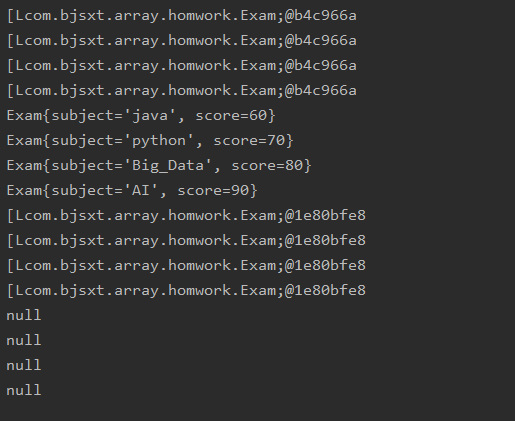
问题:老师,为什么我的数组静态初始化用普通遍历无法遍历出来呢,以及动态初始化都无法遍历出来?

代码:

public class Exam {
    private String subject;
    private int score;

    @Override
    public String toString() {
        return "Exam{" +
                "subject='" + subject + '\'' +
                ", score=" + score +
                '}';
    }

    public Exam(String subject, int score){
        this.subject = subject;
        this.score = score;

    }
}

class Main{
    public static void main(String[] args) {
        //数组的静态初始化
        Exam [] exams = {new Exam("java",60),
                         new Exam("python",70),
                         new Exam("Big_Data",80),
                         new Exam("AI",90),};
         //普通遍历
        for (int j=0;j< exams.length;j++){
            System.out.println(exams);
        }
        //for-each遍历
        for(Exam a : exams){
            System.out.println(a);
        }

        Exam [] exams2;
        exams2 = new Exam[4];
        Exam e1 = new Exam("java",60);
        Exam e2 = new Exam("python",70);
        Exam e3 = new Exam("Big_Data",80);
        Exam e4 = new Exam("AI",90);
        
        //普通遍历
        for(int i=0;i<exams2.length;i++){
            System.out.println(exams2);
        }
        
        //for-each遍历
        for (Exam b : exams2){
            System.out.println(b);
        }
    }
}

运行结果:}NPV}$I~5ORHDP7EBN~W_C4.png


JAVA 全系列/第一阶段:AI驱动的JAVA编程/数组和数据存储 3075楼

课程分类

百战程序员微信公众号

百战程序员微信小程序

©2014-2025百战汇智(北京)科技有限公司 All Rights Reserved 北京亦庄经济开发区科创十四街 赛蒂国际工业园
网站维护:百战汇智(北京)科技有限公司
京公网安备 11011402011233号    京ICP备18060230号-3    营业执照    经营许可证:京B2-20212637