会员可以在此提问,百战程序员老师有问必答
对大家有帮助的问答会被标记为“推荐”
看完课程过来浏览一下别人提的问题,会帮你学得更全面
截止目前,同学们一共提了 134335个问题

pygame
time
random
SCREEN_WIDTH=SCREEN_HEIGHT=BG_COLOR=pygame.Color()
TEXT_COLOR=pygame.Color()


MainGame():
    window=my_tank=enemyTanklist=[]
    enemyTankCount=Bullet_list=[]
    ():
        ():
        pygame.display.init()
        MainGame.window = pygame.display.set_mode([SCREEN_WIDTHSCREEN_HEIGHT])
        MainGame.my_tank=Tank()
        .createEnemyTank()
        pygame.display.set_caption()
        :
            time.sleep()
            MainGame.window.fill(BG_COLOR)
            .getEvent()
            MainGame.window.blit(.getTextSurface(%(MainGame.enemyTanklist))())
            MainGame.my_tank.displayTank()
            .blitEnemyTank()
            MainGame.my_tank.stop:
                MainGame.my_tank.move()
            .blitBullet()
            pygame.display.update()

    ():
        top=i (MainGame.enemyTankCount):
            left = random.randint()
            speed = random.randint()
            enemy=EnemyTank(lefttopspeed)
            MainGame.enemyTanklist.append(enemy)

    ():
        enemyTank MainGame.enemyTanklist:
            enemyTank.displayTank()
            enemyTank.move()
            enemyTank.randMove()

    ():
        bullet MainGame.Bullet_list:
            bullet.displyBullet()

    ():
        ()
        ()

    (text):
        pygame.font.init()
        font = pygame.font.SysFont()
        textSurface = font.render(textTEXT_COLOR)
        textSurface

    ():
        eventList = pygame.event.get()
        event eventList:
            event.type == pygame.QUIT:
                .endGame()
            event.type == pygame.KEYDOWN:
                event.key == pygame.K_LEFT:
                    MainGame.my_tank.direction=MainGame.my_tank.stop=()
                event.key == pygame.K_RIGHT:
                    MainGame.my_tank.direction = MainGame.my_tank.stop = ()
                event.key == pygame.K_UP:
                    MainGame.my_tank.direction = MainGame.my_tank.stop = ()
                event.key == pygame.K_DOWN:
                    MainGame.my_tank.direction = MainGame.my_tank.stop = ()
                event.key ==pygame.K_SPACE:
                    ()
                    m = Bullet(MainGame.my_tank)
                    MainGame.Bullet_list.append(m)
                event.type==pygame.KEYUP:
                event.key ==pygame.K_UP event.key==pygame.K_LEFT event.key==pygame.K_DOWN event.key==pygame.K_RIGHT:
                    MainGame.my_tank.stop=Tank():
    (lefttop):
        .images={
            :pygame.image.load():pygame.image.load():pygame.image.load():pygame.image.load()}
        .direction = .image=.images[.direction]
        .rect=.image.get_rect()
        .rect.left=left
        .rect.top=top
        .speed=.stop=():
        .direction ==:
            .rect.left > :
                .rect.left-=.speed
        .direction ==:
            .rect.top>:
                .rect.top-=.speed
        .direction ==:
            .rect.top+.rect.height<SCREEN_HEIGHT:
                .rect.top+=.speed
        .direction ==:
            .rect.left+.rect.height < SCREEN_WIDTH:
                .rect.left+=.speed

    ():
        Bullet()

    ():
        .image=.images[.direction]
        MainGame.window.blit(.image.rect)

MyTank(Tank):
    ():
        EnemyTank(Tank):
    (lefttopspeed):
        .images={
            : pygame.image.load(): pygame.image.load(): pygame.image.load(): pygame.image.load()
        }

        .direction=.randomDirection()
        .image=.images[.direction]
        .rect=.image.get_rect()
        .rect.left=left
        .rect.top=top
        .speed=speed
        .flag=.step = ():
        num=random.randint()
        num==:
            num==:
            num==:
            num==:
            ():
        .step <=:
            .direction=.randomDirection()
            .step=random.randint()
        :
            .move()
            .step-=Bullet():
    ():
        .image = pygame.image.load()
        .direction = tank.direction
        .rect = .image.get_rect()
        .direction == :
            .rect.left = tank.left + tank.rect.width / - .rect.width / .rect.top = tank.top - .rect.height
        .direction == :
            .rect.left = tank.rect.left - .rect.width / - .rect.width / .rect.top = tank.rect.top + tank.rect.width / - .rect.width / .direction == :
            .rect.left = tank.rect.left + tank.rect.width / - .rect.width / .rect.top = tank.rect.top + tank.rect.height
        .direction == :
            .rect.left = tank.rect.left + tank.rect.width
            .rect.top = tank.rect.top + tank.rect.width / - .rect.width / .speed = random.randint(())

    ():
        ():
        MainGame.window.blit(.image.self.rect)


Wall():
    ():
        ():
        Explode():
    ():
        ():
        Music():
    ():
        ():
        __name__== :
    MainGame().startGame()

F:\Python\pythonProject\Tank\venv\Scripts\python.exe F:/Python/pythonProject/Tank/13.py

pygame 2.0.1 (SDL 2.0.14, Python 3.9.1)

Hello from the pygame community. https://www.pygame.org/contribute.html

发射子弹

Traceback (most recent call last):

  File "F:\Python\pythonProject\Tank\13.py", line 329, in <module>

    MainGame().startGame()

  File "F:\Python\pythonProject\Tank\13.py", line 52, in startGame

    self.getEvent()

  File "F:\Python\pythonProject\Tank\13.py", line 143, in getEvent

    m = Bullet(MainGame.my_tank)

TypeError: __init__() takes 1 positional argument but 2 were given


Process finished with exit code 1

请问老师我哪里多给参数了?

Python全系列/第二阶段:Python 深入与提高/游戏开发-坦克大战 23566楼
JAVA 全系列/第八阶段:Linux入门到实战/Maven 23567楼

 <div class="conetnt-title">推荐餐厅</div>
    <div class="conetnt">
        <div class="items">
            <div class="items-top">
                <img src="img/xl-logo2x.png" alt="">
                <p>商家标题一</p>
                <p>人均:¥20.00 |10人预订</p>
                <p>
                    <i class="iconfont">&#xe636;</i>
                    <i class="iconfont">&#xe636;</i>
                    <i class="iconfont">&#xe636;</i>
                    <i class="iconfont">&#xe636;</i>
                    <i class="iconfont">&#xe636;</i>
                </p>
            </div>
        </div>
            <div class="items-bottom">南屏街金马坊</div>
        </div>
    </div>
.conetnt-title{
    width: 100%;
    height: 25px;
    padding-left: 10px;
    box-sizing: border-box;
    color: #017e5c;
    text-align: left;
    line-height: 25px;
    background-color: #eee;
}
.conetnt{
    padding: 10px;
    box-sizing: border-box;
}
.items{
    width: 100%;
    height: 110px;
}
.items-top{
    width: 100%;
    height: 80px;
    background-color:red;
    display: flex;
}
.items-bottom{
    width: 100%;
    height: 30px;
    background-color: #eee;
    text-align: left;
    line-height: 30px;
    color: #a6a6a6;
}
.items-top>img{
    width: 75px;
    height: 75px;
    margin: 5px 15px 5px 5px;
}

老师,这个字体出来为啥是水平排列的?

WEB前端全系列/第一阶段:HTML5+CSS3模块/响应式项目 23568楼

老師我已經解決了,原來在mac上menubar都會在屏幕的最頂部我沒看到以為有問題 而且選項單中為什麼ctr+n會顯示不出來我給你原代碼你試試看


"""開發記事本軟件菜單"""

from tkinter import *

class Application(Frame):

    def __init__(self, master=None):

        super().__init__(master)

        self.master = master

        self.textpad = None

        self.pack()

        self.creatWidget()

    def creatWidget(self):

        """創建主菜單欄"""

        menubar = Menu(root)

        #創建子菜單

        menuFile = Menu(menubar)

        menuEdit = Menu(menubar)

        menuHelp = Menu(menubar)

        #將子菜單加入到主菜單欄

        menubar.add_cascade(label="文件(F)", menu=menuFile)

        menubar.add_cascade(label="編輯(E)", menu=menuEdit)

        menubar.add_cascade(label="幫助(H)", menu=menuHelp)

        #添加菜單選項label

        menuFile.add_command(label="新建", accelerator="ctr+n", command=self.text)

        menuFile.add_command(label="打開", accelerator="ctr+o", command=self.text)

        menuFile.add_command(label="保存", accelerator="ctr+s", command=self.text)

        menuFile.add_separator() # 添加分割線

        menuFile.add_command(label="退出", accelerator="ctr+q", command=self.text)

        #將主菜單欄添加到根窗口

        root["menu"] = menubar

        #文本編輯區

        self.textpad = Text(root, width=50, height=30)

        self.textpad.pack()

    def text(self):

        pass

if __name__ == '__main__':

    root = Tk()

    root.geometry("400x300+200+300")

    root.title("記事本")

    app = Application(master=root)

    root.mainloop()
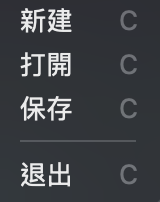
螢幕截圖 2021-03-27 上午4.38.14.png

Python全系列/第二阶段:Python 深入与提高/GUI编程(隐藏) 23570楼
Python全系列/第一阶段:AI驱动的Python编程/面向对象 23573楼
JAVA 全系列/第六阶段:项目管理与SSM框架/SpringMVC 23574楼
Python全系列/第一阶段:AI驱动的Python编程/编程基本概念 23576楼
JAVA 全系列/第五阶段:Web全栈开发基础与Vue/HTML5(旧) 23579楼

课程分类

百战程序员微信公众号

百战程序员微信小程序

©2014-2025百战汇智(北京)科技有限公司 All Rights Reserved 北京亦庄经济开发区科创十四街 赛蒂国际工业园
网站维护:百战汇智(北京)科技有限公司
京公网安备 11011402011233号    京ICP备18060230号-3    营业执照    经营许可证:京B2-20212637