会员可以在此提问,百战程序员老师有问必答
对大家有帮助的问答会被标记为“推荐”
看完课程过来浏览一下别人提的问题,会帮你学得更全面
截止目前,同学们一共提了 134307个问题
Python全系列/第一阶段:AI驱动的Python编程/序列 26221楼

一、问题

        这一集课后作业做完了,想让老师给检查一下,看看有没有问题,是不是达到了这次课后作业的要求

作业要求如图:
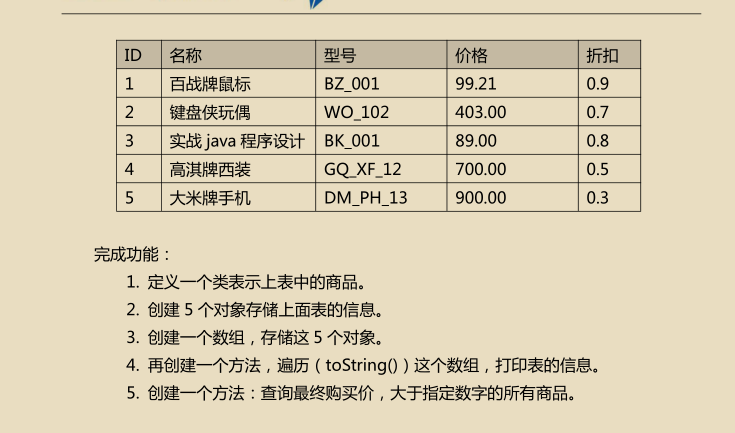
image.png


二、作业源码

package com.bjsxt.array;

/**
 * 完成功能:
 * 1. 定义一个类表示上表中的商品。
 * 2. 创建 5 个对象存储上面表的信息。
 * 3. 创建一个数组,存储这 5 个对象。
 * 4. 再创建一个方法,遍历(toString())这个数组,打印表的信息。
 * 5. 创建一个方法:查询最终购买价,大于指定数字的所有商品。
 *
 */
public class Test05zuoye {

    public void print(double m){
        Info info0 = new Info(1,"百战牌鼠标", "BZ_001", 99.21 ,0.9);
        Info info1 = new Info(2,"键盘侠玩偶", "WO_102", 403.00 ,0.7);
        Info info2 = new Info(3,"实战尚学堂", "java", 89.00 ,0.8);
        Info info3 = new Info(4,"高淇牌西装", "GQ_XF_12", 700.00 ,0.5);
        Info info4 = new Info(5,"大米牌手机", "DM_PH_13", 900.00 ,0.3);

        Info[] infos = new Info[5];
        infos[0] = info0;
        infos[1] = info1;
        infos[2] = info2;
        infos[3] = info3;
        infos[4] = info4;

        for (int i = 0;i<infos.length;i++){
            System.out.println(infos[i]);
            for (int j = 0 ;j<infos.length;j++){
                System.out.println("遍历所有:"+infos[j].getName()+"   "+infos[j].getPrice()+"   "+infos[j].getCheap());
                if((infos[j].getPrice())*(infos[j].getCheap())>m){
                    System.out.println("打折后的价格:"+(infos[j].getPrice())*(infos[j].getCheap()));
                    System.out.println("输出结果:"+infos[j].getName());
                    System.out.println("===================================");
                }else{
                    System.out.println("最终购买价小于指定数字,抱歉!");
                }
            }
        }
    }


    public static void main(String[] args) {
        Test05zuoye test05zuoye = new Test05zuoye();
        test05zuoye.print(100);

    }

}
class Info{
    private int id;
    private String name;
    private String type;
    private double price;
    private double cheap;

    @Override
    public String toString() {
        return
                "id=" + id +'\t'+
                "name='" + name + '\t' +
                "type='" + type + '\t' +
                "price=" + price +'\t'+
                "cheap=" + cheap +'\t'
                ;
    }

    public Info(){

    }
    public int getId() {
        return id;
    }

    public void setId(int id) {
        this.id = id;
    }

    public String getName() {
        return name;
    }

    public void setName(String name) {
        this.name = name;
    }

    public String getType() {
        return type;
    }

    public void setType(String type) {
        this.type = type;
    }

    public double getPrice() {
        return price;
    }

    public void setPrice(double price) {
        this.price = price;
    }

    public double getCheap() {
        return cheap;
    }

    public void setCheap(double cheap) {
        this.cheap = cheap;
    }

    public Info(int id, String name, String type, double price, double cheap) {
        this.id = id;
        this.name = name;
        this.type = type;
        this.price = price;
        this.cheap = cheap;
    }
}


三、运行结果
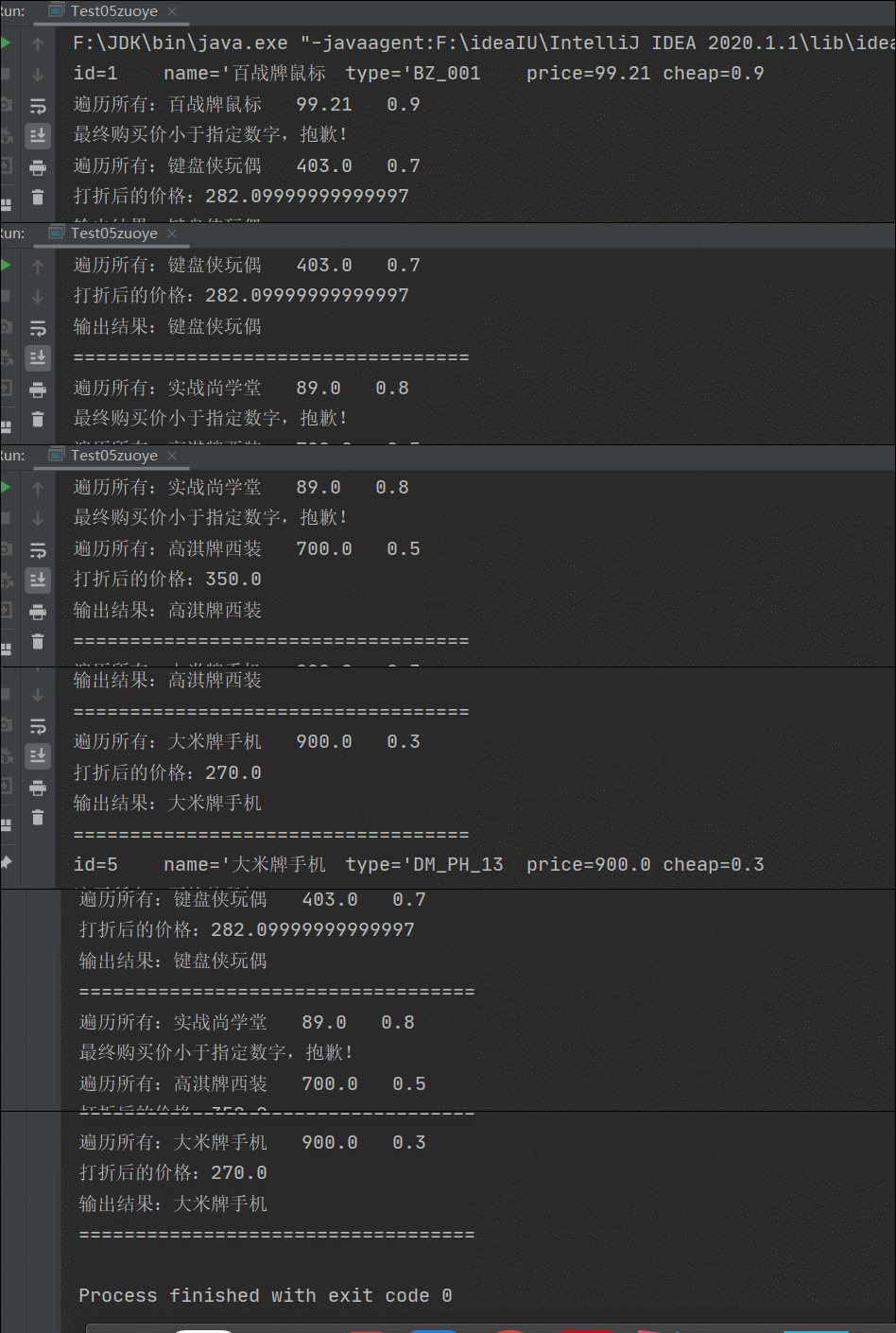
GIF3.gif

JAVA 全系列/第一阶段:AI驱动的JAVA编程/数组和数据存储 26222楼
Python全系列/第三阶段:Python 网络与并发编程/网络通信 26223楼
JAVA 全系列/第一阶段:AI驱动的JAVA编程/控制语句、方法、递归算法 26224楼
JAVA 全系列/第二阶段:JAVA 基础深化和提高/容器(旧) 26228楼

老师我想问一下我按下空格还是会停止移动,我代码和你代码一样的
pygametime
SCREEN_WIDTH=SCREEN_HEIGHT=BG_COLOR=pygame.Color()  text_COLOR=pygame.Color()
MainGame():
    window=my_tank=():
        ():
         pygame.display.init()
        MainGame.window=pygame.display.set_mode([SCREEN_WIDTHSCREEN_HEIGHT])
         MainGame.my_tank=Tank()
        pygame.display.set_caption()
        :
            time.sleep()
            MainGame.window.fill(BG_COLOR)
            .getEvent()
            MainGame.window.blit(.getTextSuface(%)())
            MainGame.my_tank.displayTank()
            MainGame.my_tank.stop:
             MainGame.my_tank.move()
            pygame.display.update()


    ():
        ()
        ()
    (text):
        pygame.font.init()
        font=pygame.font.SysFont()
        textSuface=font.render(texttext_COLOR)
        textSuface
    ():
        eventList=pygame.event.get()
        event eventList:
            event.type == pygame.QUIT:
                .endGame()
            event.type == pygame.KEYDOWN:

                event.key == pygame.K_LEFT:
                    MainGame.my_tank.direction = MainGame.my_tank.stop=()
                event.key == pygame.K_RIGHT:
                    MainGame.my_tank.direction = MainGame.my_tank.stop = ()
                event.key == pygame.K_UP:
                    MainGame.my_tank.direction = MainGame.my_tank.stop = ()
                event.key == pygame.K_DOWN:
                    MainGame.my_tank.direction = MainGame.my_tank.stop = ()
                event.key==pygame.K_SPACE:
                    ()

                    event.type == pygame.KEYUP:
                event.key==pygame.K_UP pygame.K_DOWN pygame.K_RIGHT pygame.K_RIGHT:
                    MainGame.my_tank.stop = Tank():
    (lefttop):
        .images = {: pygame.image.load(): pygame.image.load(): pygame.image.load(): pygame.image.load()
                       }
        .direction=.image=.images[.direction]
        .rect=.image.get_rect()
        .rect.left=left
        .rect.top=top
        .speed=.stop=():
        ():
        .direction == :
            .rect.left > :
               .rect.left -= .speed
        .direction == :
            .rect.right < :
               .rect.right += .speed
        .direction == :
            .rect.top+.rect.height < :
               .rect.top += .speed
        .direction == :
            .rect.top>:
               .rect.top -= .speed
    ():
        .image=.images[.direction]
        MainGame.window.blit(.image.rect)
Mytank(Tank):
    ():
        Enemytank(Tank):
    ():
        Bullet():
    ():
        ():
        ():
        Wall():
    ():
        ():
        Music():
    ():
        ():
        Explode():
    ():
        ():
        __name__==:
    MainGame().startGame()


Python全系列/第二阶段:Python 深入与提高/游戏开发-坦克大战 26229楼
7u职场软实力/第五阶段:沟通力/第五章:批评的来源与方法 26230楼


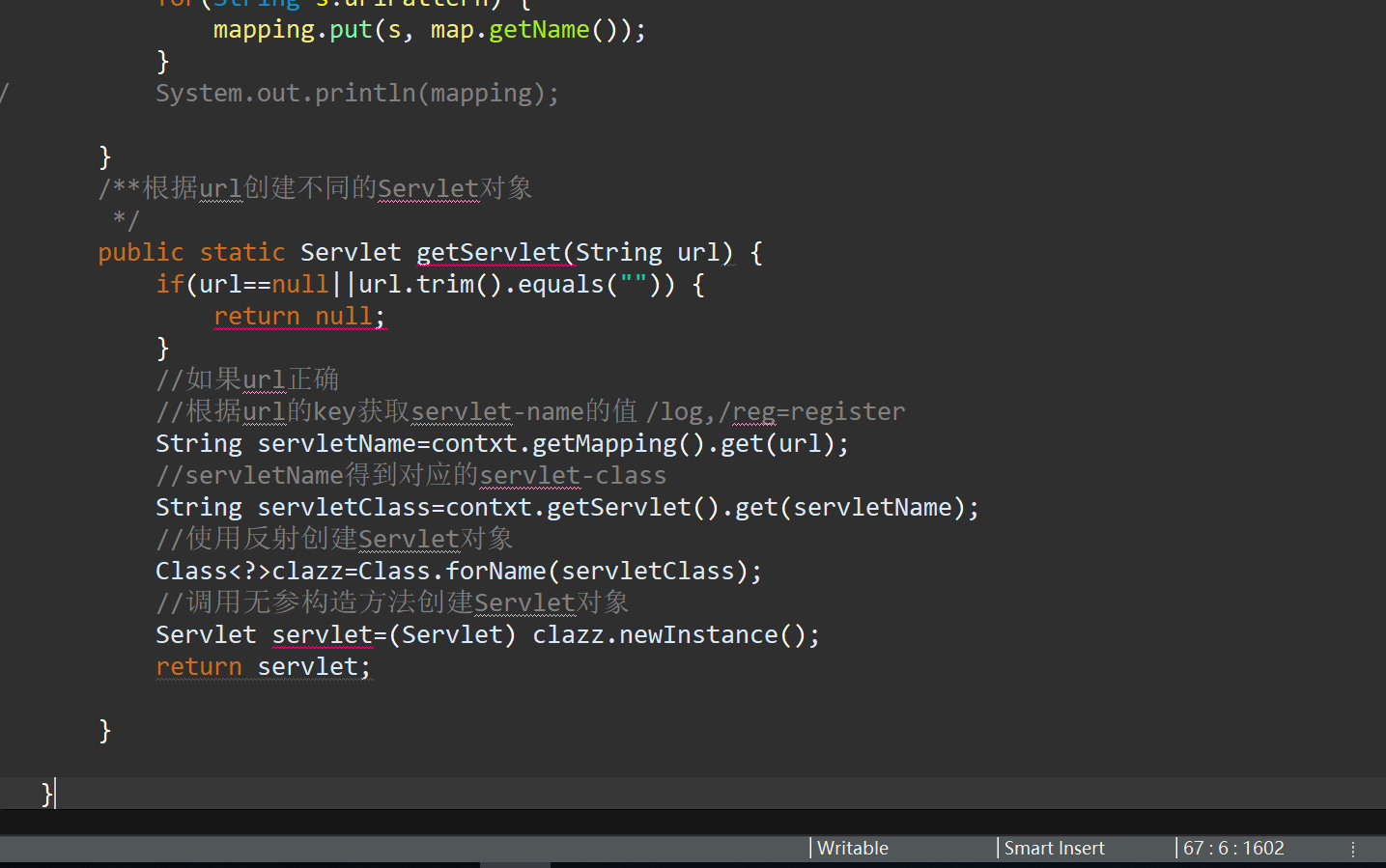
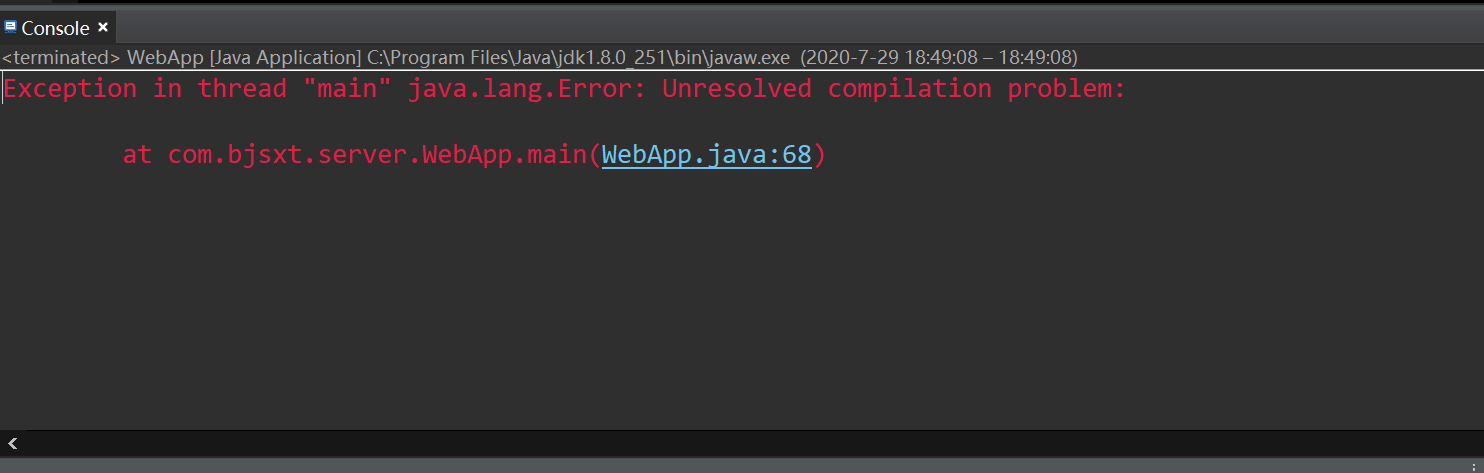
老师您好,您看一下我的代码和运行结果,帮我指出哪里出现了问题

package com.bjsxt.server;

import java.util.List;
import java.util.Map;

import com.bjsxt.servlet.Servlet;


/**
 * 
 * @author zhang - dell
 *用于初始化程序运行的数据
 *和根据不同的url创建所请求的Servlet对象
 */
public class WebApp {//App应用程序
	private static ServletContext contxt;
	
	static {
		contxt=new ServletContext();
		//分别获取对应关系的Map集合
		Map<String,String> servlet=contxt.getServlet();
		Map<String,String> mapping=contxt.getMapping(); 
		
		//创建解析XML文件
		WebDom4j web = new WebDom4j();
		web.parse(web.getDocument());//解析XML
		
		//获取解析XML之后的List集合
		List<Entity> entityList = web.getEntityList();
		List<Mapping> mappingList = web.getMappingList();
		
		//将List集合中的数据存储到Map集合
		for(Entity entity : entityList) {
			
			servlet.put(entity.getName(),entity.getClazz());
		}
//		System.out.println(servlet);
		for(Mapping map : mappingList) {
			//遍历url-pattern的集合
			List<String> urlPattern=map.getUrlPattern();
			for(String s:urlPattern) {
				mapping.put(s, map.getName());
			}
//			System.out.println(mapping);
			
		}
		/**根据url创建不同的Servlet对象
		 */
		public static Servlet getServlet(String url) {
			if(url==null||url.trim().equals("")) {
				return null;
			}
			//如果url正确
			//根据url的key获取servlet-name的值 /log,/reg=register
			String servletName=contxt.getMapping().get(url);
			//servletName得到对应的servlet-class
			String servletClass=contxt.getServlet().get(servletName);
			//使用反射创建Servlet对象
			Class<?>clazz=Class.forName(servletClass);
			//调用无参构造方法创建Servlet对象
			Servlet servlet=(Servlet) clazz.newInstance();
			return servlet;
		
		}
		
	}
	public static void main(String[] args) {
		
	}
	
}

代码截图:


    blob.png

运行截图:

blob.png

JAVA 全系列/第二阶段:JAVA 基础深化和提高/手写服务器项目(旧) 26231楼

super()和__init__()的区别?以前好像没讲清楚


Python全系列/第四阶段:函数式编程和核心特性/内存管理(旧) 26233楼

安装pycrypto坑太多,分享博文参考:https://blog.csdn.net/weixin_42345642/article/details/95305159

https://jingyan.baidu.com/article/95c9d20d7784ebec4f75616e.html

我是报的error: command 'C:\\Program Files (x86)\\Microsoft Visual Studio\\2019\\Community\\VC\\Tools\\MSVC\\14.26.28801\\bin\\HostX86\\x86\\cl.exe' failed with exit status 2

解决办法是:

  1. 参照博文设置用户环境变量:注意变量值根据实际路径来

image.png

2. win+R运行cmd,执行命令set CL=/FI”%VCINSTALLDIR%\Tools\MSVC\14.26.28801\include\stdint.h” %CL%

这里stdint.h也要根据实际路径来

3.命令行窗口重新执行pip install pycrypto -i http://pypi.douban.com/simple --trusted-host pypi.douban.com

安装成功


Python全系列/下架-第十二阶段:Python_大型电商项目(5天后下架)/Django项目阶段-电商项目(旧) 26235楼

课程分类

百战程序员微信公众号

百战程序员微信小程序

©2014-2025百战汇智(北京)科技有限公司 All Rights Reserved 北京亦庄经济开发区科创十四街 赛蒂国际工业园
网站维护:百战汇智(北京)科技有限公司
京公网安备 11011402011233号    京ICP备18060230号-3    营业执照    经营许可证:京B2-20212637